
Trade MT4 & MT5 From Your Browser: How FXVNPro Browser Trading Works
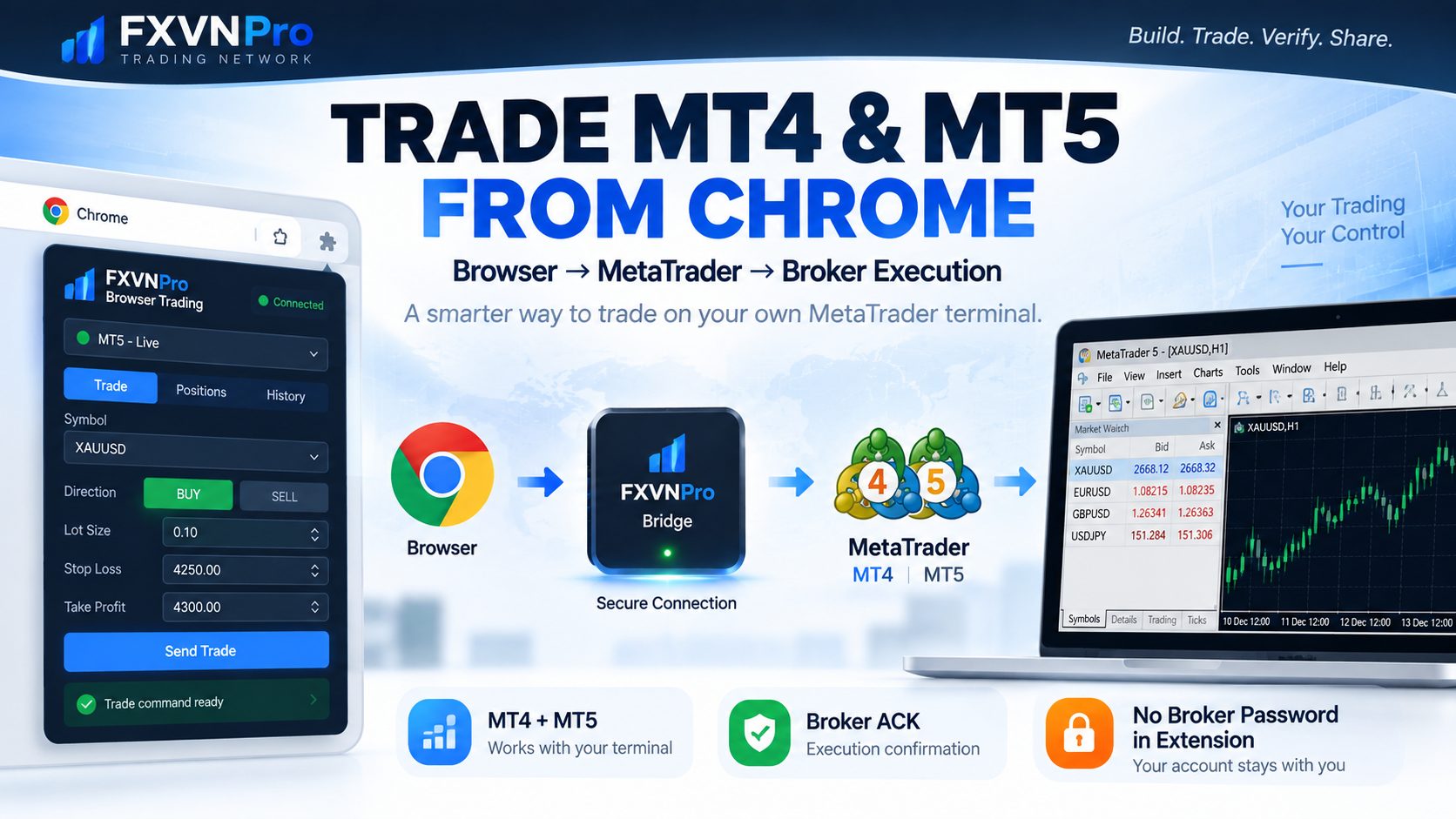

Trade From Chrome
Access essential supported trade controls without constantly
switching back to MetaTrader.
MT4 + MT5
Connect supported MetaTrader environments across different brokers.
Keep Your Password
Your broker trading password is not required inside the extension.
Save & Share
Keep supported trade records and share your trading journey.
Your MetaTrader Stays Where It Is.
Your Trading Controls Come to Chrome.
Traders already spend much of their day in a browser — checking charts,
reading market news, researching brokers, reviewing signals and
building trade setups.
FXVNPro Browser Trading is designed to shorten the distance between
seeing a trading opportunity and taking supported action through
your own MT4 or MT5 account.
ONE BROWSER · MULTIPLE METATRADER CONNECTIONS
Trade Across Your MT4 & MT5 Broker Accounts
Maybe you trade gold with one broker, forex with another,
or maintain different MT4 and MT5 accounts for different strategies.
FXVNPro Browser Trading can work with saved supported connections,
allowing you to select the MetaTrader environment you want to use
before preparing your trade.
Broker A
MT4 Account
Broker B
MT5 Account
Broker C
MT4 / MT5
Chrome
Select Connection
See the Trade. Open Chrome. Take Action.
Browser Trading focuses on the essential actions traders need once
they have already made a trading decision.
1
Select Your Account
Choose the saved supported MT4 or MT5 connection you want to trade.
2
Prepare the Trade
Choose the supported symbol, BUY or SELL, lot size and available
Stop Loss / Take Profit values.
3
Send the Trade
Send the supported instruction through your connected
MetaTrader environment.
4
Follow the Result
Review available execution information and keep the trading
activity connected to your record.
A Faster Way to Go From Idea to Trade
Imagine you are researching gold in Chrome and decide that your
XAUUSD setup is ready. Instead of changing applications, you can
prepare the supported trade from your Browser Trading interface.
FXVNPRO BROWSER TRADING
● MT5 CONNECTED
SYMBOL
XAUUSD
DIRECTION
BUY
LOT
0.10
STOP LOSS
4250
TAKE PROFIT
4300
Select Connection → Prepare Trade → Send → Follow Execution
Open. Manage. Close.
Browser Trading focuses on practical trading actions rather than
trying to reproduce the entire MetaTrader desktop interface inside Chrome.
↑
Open Trades
Send supported BUY or SELL instructions with lot size and
available Stop Loss / Take Profit parameters.
±
Manage the Trade
Modify supported Stop Loss and Take Profit values while the
position is active.
×
Close the Trade
Send a supported close instruction through the browser and
your connected MetaTrader environment.
YOUR ACCOUNT · YOUR PASSWORD · YOUR CONTROL
No Broker Password in the Extension
FXVNPro Browser Trading does not require you to enter your broker
trading password into the Chrome extension.
Your own MetaTrader terminal remains connected to your broker.
Browser Trading uses a separate supported FXVNPro connection
between Chrome and your MetaTrader environment.
That keeps the browser connection separate from the password you
use to access your broker trading account.
Your Broker Account. Your MetaTrader. Your Broker Password Stays With You.
How Does FXVNPro Browser Trading Work?
You do not need to understand the infrastructure behind the system.
From the trader’s point of view, the journey is simple.
YOUR TRADING JOURNEY
Chrome
→
FXVNPro
→
Your MT4 / MT5
→
Your Broker
MetaTrader is not being replaced. Browser Trading simply provides
another interface for supported trading actions while your own
MT4 or MT5 environment remains part of the workflow.
AFTER THE TRADE
Save the Result. Build Your Trading History.
A useful trade does not have to disappear into a long MetaTrader
account history.
Supported FXVNPro workflows can connect trading activity with a
trading record, helping you revisit what happened and build a
clearer history of your trading activity.
Save the Trade
Keep supported trading information connected to your
FXVNPro trading history.
Review the Result
Look back at available execution and result information
instead of relying only on memory.
Build Your Record
Turn individual trades into a more useful personal trading history.
Trade It. Record It. Share It.
Sometimes a trade is something you want to keep for yourself.
Other times, you may want to share your setup or result with other traders.
Supported FXVNPro trading records can become shareable trading content,
giving you a cleaner way to present a trade than posting an
unexplained screenshot.
↗
Share Your Trade
Turn supported trade information into content that is easier
to share with other traders.
◎
Social Sharing
Use available sharing options to bring your trading record
to your social audience.
✓
More Than a Screenshot
Keep available trading context together instead of sharing
only an isolated screenshot.
FROM TRADE IDEA TO TRADING RECORD
A Screenshot Shows a Trade.
A Trading Record Can Tell More of the Story.
FXVNPro separates planning a trade from the available information
about what happened through the connected trading workflow.
TRADE IDEA
→
BROWSER TRADE
→
MT4 / MT5
→
RESULT
→
SAVE / SHARE
A verified or recorded trade does not mean the trade was profitable,
prove that a strategy works, or guarantee future performance.
It adds available context to the trading record.
Build. Trade. Record. Follow.
Browser Trading is not designed as an isolated BUY/SELL button.
It can become part of a wider FXVNPro trading workflow.
01 · BUILD
Trade Idea Builder
Turn your market view into a structured trading setup.
02 · TRADE
Browser Trading
Send supported MT4 and MT5 trading actions from Chrome.
03 · RECORD
Verified Trades
Keep available execution and result context with the trade.
04 · FOLLOW
CopyTrade
Explore available Master traders and their trading activity.
Who Is Browser Trading For?
FXVNPro Browser Trading is designed for traders who want quicker
access to their supported MetaTrader workflow without giving up
control of their own trading environment.
✓
Traders using MT4 or MT5
✓
Traders using accounts across different brokers
✓
Traders who spend much of their workflow in Chrome
✓
Traders who want faster access to common trade controls
✓
Users who want their broker password kept out of the extension
✓
Traders who want to save and share supported trade records
Frequently Asked Questions
Can I trade MT4 from Chrome?
FXVNPro Browser Trading is designed to send supported trading
actions from Chrome through your connected MT4 environment.
Can I trade MT5 from Chrome?
Yes. FXVNPro Browser Trading also supports connected MT5
trading workflows.
Can I use Browser Trading with different brokers?
Browser Trading is designed around supported MT4 and MT5
connections rather than one specific broker. Compatibility can
depend on the broker, MetaTrader environment, symbol configuration
and individual trading setup.
Does FXVNPro need my broker trading password?
The FXVNPro Browser Trading Chrome extension does not require
you to enter your broker trading password. Your connected
MetaTrader environment remains separate from the browser extension.
Can I set Stop Loss and Take Profit?
Supported Browser Trading actions can include Stop Loss and
Take Profit parameters, and supported open positions can receive
SL/TP modification instructions.
Can I close a trade from my browser?
Supported open positions can receive close instructions through
Browser Trading and your connected MetaTrader environment.
Can I save my trading results?
Supported FXVNPro workflows can preserve available trading,
execution and result information as part of a trading record.
Can I share my trades on social media?
Supported trade records can be used with available FXVNPro
sharing options, allowing traders to share their trading content
more easily.
Does Browser Trading guarantee execution?
No. Execution can be affected by MetaTrader availability,
connectivity, broker conditions, market conditions, pricing
and other factors.
FXVNPRO BROWSER TRADING
Your MT4 & MT5 Accounts.
Now Closer to Your Browser.
Connect supported MetaTrader accounts across your brokers,
access essential trading controls faster from Chrome, keep your
broker password out of the extension, and turn supported trades
into records you can save and share.
Risk Disclosure:
Trading forex, CFDs and other leveraged financial products involves
substantial risk and can result in losses. FXVNPro Browser Trading
is a trade-management interface and does not guarantee order execution,
profits or trading results. Execution and results may be affected by
broker conditions, market conditions, connectivity, pricing, slippage
and other factors. Traders remain responsible for their trading
decisions, position sizing and risk management.
Trade With A Regulated Broker





Related posts:
 What is Forex Trading? A Beginner’s Guide (2026 Update)
 The Concept Of Forex Demo Contest And Forex Live Contest
 Forex Market vs. Other Financial Markets
 Selecting the Best Forex Rebate Provider
 How Can I Start Forex Trading in 2026? A Complete Beginner-to-Pro Guide
 What Is Forex Trading? Beginner Guide 2026 (Complete & Honest)
 How Forex Market Works (Explained Simply) – Beginner Guide 2026
 What Are Currency Pairs in Forex? Beginner Guide 2026
 How Forex Trading Makes Money – Beginner Guide 2026
 FXVN CopyTrade 2.0: Copy MT4 & MT5 Traders With Risk Control