Tiomarkets
- How the bonus really works
- Exact withdrawal rules & hidden conditions
- Common risks traders overlook
- Who should — and should NOT — use this bonus
This MT4 vs MT5 guide compares two popular trading platforms.
Both platforms are available to download and try. Just register to open an account or log in to your secure client portal.
Keep reading if you prefer to learn more about their similarities and differences first. So you can choose whatever platform you think is best.
Let’s start with a quick introduction.
MT4 was designed and developed by Metaquotes for forex and futures trading. To enable traders to analyse and trade financial markets, back test trading strategies, develop trading robots and copy other traders.
It was quickly adopted as the preferred trading platform by millions of traders and hundreds of brokerages worldwide.
MT5 is a multi-asset trading platform and the recent successor. This award-winning trading platform includes everything you will find in MT4. It has more capabilities and technical analysis tools than its predecessor has.
Both trading platforms are available to download to your computer, smartphone or through an internet browser.
MT4 vs MT5: What trading platform to choose?
This is a commonly asked question and the answer depends on your preferences. Both trading platforms are good and easy to use. Most people prefer MT4 for its simplicity and the large library of third party plug-ins. Others prefer MT5 because it is more capable and has superior technical analysis tools.
This MT4 vs MT5 guide will highlight the similarities and differences between both of these platforms. The points of comparison include;
- The user interfaces and layout
- The Market watch window
- Toolbar features
- Charting and technical indicators
- Trading order types
- Account management and reporting
- Trading automation and strategy tester
- Platform compatibility
User interface and layout
When you download the trading platforms and open them, the first thing that you will notice is the user interface and layout.
Both platforms look very similar with four main sections or layouts.
There is a market watch window to the left, a chart area, a tool bar and menus at the top and a tool box or terminal at the bottom.
All these areas have their own specific functions and are customizable on both platforms. Just right-click in the respective areas and a pop up menu will appear with a list of options.
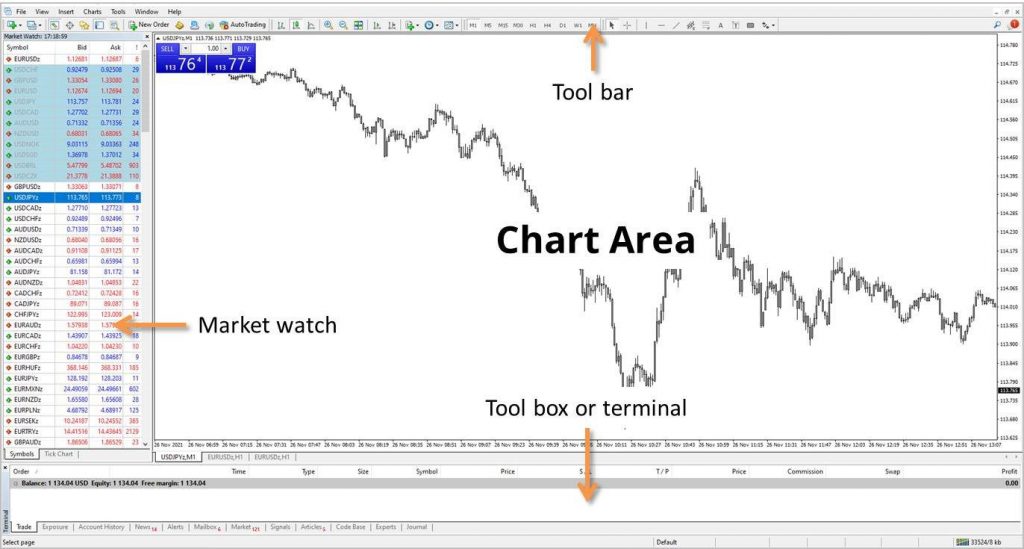
The only difference between MT4 vs MT5 is that MT5 has a slightly modern or updated look. MT5 also has more customizable options and visible features in the tool bar.
Advertisement

MT4 vs MT5 market watch window
The market watch window lists all the symbols that are available for trading. This list can be customized on both trading platforms, so you can see all symbols or just your favourites.
MT4 allows you to view the bid and ask prices for each symbol. It customizability includes viewing of the daily high and low prices as well as the spread in separate columns.
On the other hand, MT5 allows you to customize the market watch window with 46 different data points. Each data point can be displayed in a separate column alongside the symbol’s bid and ask prices. Most of these data points might be redundant, depending on the symbol or the broker you are trading with.
Furthermore, most users won’t be interested in displaying all 46 data points, because they are not all relevant for trading. However, there is some additional market information you can add that might be useful.
The MT5 trading platform also has additional tabs at the bottom of the market watch window. In MT5, you can view details about each symbols daily performance, as well as the ability to execute trades from a one-click trade panel.
That’s a nice feature if you prefer to see the list of symbols like a trade panel instead of in a table format like MT4.
Trading directly from the market watch window is possible in both trading platforms. You can right-click on any of the symbols and select new order from a pop up menu.

MT4 vs MT5 toolbar features
The toolbar is found at the top of both trading platforms and contains a series of menus and buttons.
The icons allow you to quickly place orders; change the chart type and timeframe and also access different drawing tools to mark up your charts.
Both platforms include 3 chart types, all the standard indicators for technical analysis, a strategy tester, and a programming environment.
The differences between MT4 vs MT5 are; MT5 has a greater selection of chart time frames, technical indicators and drawing tools.
- MT5 includes 38 technical indicators vs 30 in MT4
- There are 44 graphical objects in MT5 vs 31 in MT4
- MT5 has 21 different chart timeframes vs 9 in MT4
While MT4 is adequate for most users needs, MT5 offers more features than its predecessor.
These features might not be immediately apparent but the toolbar can be customized according to your preferences.
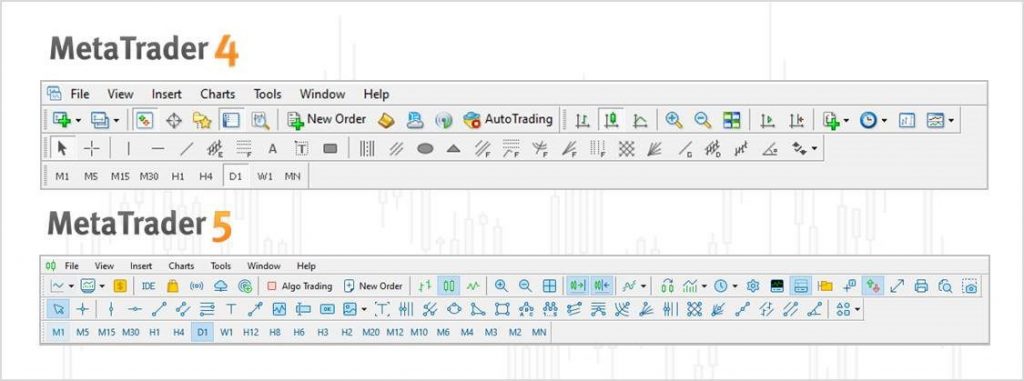
Whatever features aren’t available from the toolbar can be accessed from the menu at the very top.
MT4 vs MT5 charting and technical indicators
Traders usually put most of their attention on the chart area. It is an indispensable tool to help make better informed trading decisions.
MT4 vs MT5’s charting area is practically the same in terms of look and feel. Both platforms allow for customization and come bundled with many technical indicators. You can overlay them on the price chart or attach them to the bottom of it.
Furthermore, you can view multiple chart windows at the same time on both trading platforms.
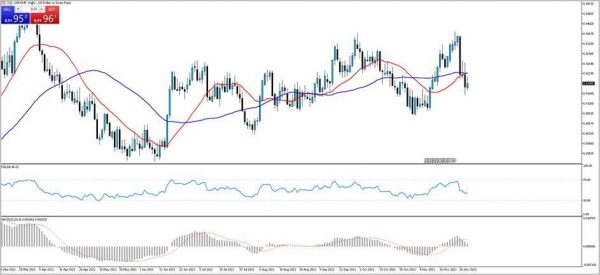
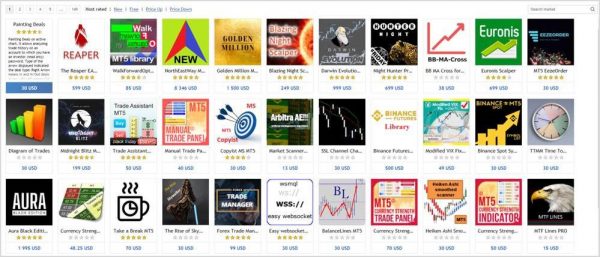
The main difference between MT4 vs MT5 for this point of comparison is that MT4 has fewer technical indicators built in to the platform. However, it has a larger library of third party plug-ins than MT5 does. This is probably because MT4 has been around for longer and still has a larger community of traders using it.
Also, MT5 has a built in financial calendar while MT4 does not. So you don’t have to leave the platform to check for economic data releases. An indicator is conveniently placed on the horizontal time axis reminding you about when they will occur.
Both trading platforms have direct access to the MQL4 and MQL5 marketplace, where you can find and download custom built indicators and scripts.
Both trading platforms allow you to place and modify orders directly from the charts. You can also see the opening and closing prices of historical trades directly on the charts.
Trading order types
There are several ways that you can place orders on both trading platforms.
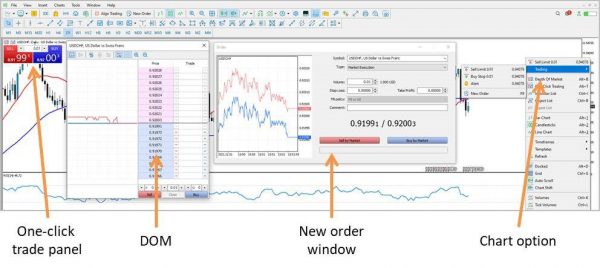
The first and most obvious way is to click the new order button in the toolbar. A window will appear presenting several other options regarding the type of order to place.
The first one is a market execution, this is an order to buy or sell at the current market price.
The alternative is to place a pending order, which is an order to buy or sell at a specific price. The pending orders available on MT4 vs MT5 are fewer; there are more options on the MT5 trading platform.
Both platforms allow you to place stop loss and take profit orders, as well as pending orders with expiration limits.
On the MT5 platform only, the option exists to place a buy stop limit and a sell stop limit. These orders are a combination of the buy stop and buy limit or the sell stop and sell limit orders. When combined, they create one buy stop limit or sell stop limit order.
The way this work is by entering two prices with the order. The first price triggers an order to be placed at another price.
The alternative ways to place orders exists by right clicking in the chart area and selecting the option from a pop up menu that appears.
Both trading platforms also allow one-click trading from a trade panel in the chart area but this must be enabled by the user.
MT5 also has a depth of market (DOM) window, while MT4 does not. This is just another way to view price movements and place trades.
MT4 vs MT5 account management and reporting
Trading account management and reporting are available from the terminal at the bottom of the platform
Specifically, there is a trade tab and an account history tab. All the open, pending and closed orders are displayed here.
This section operates similarly on both trading platforms. There isn’t much difference between the terminal in MT4 vs MT5’s toolbox. You can right-click on the open trades to modify or close them and also customize the columns for each deal record.
MT5 provides slightly more customization options but this doesn’t make a major operational difference.
As far as reporting goes, both platforms provide this ability. The account history tab displays all historical trades and they can be filtered by date and each column can be sorted.
MT5 provides slightly more reporting functions and you can filter the results by symbol traded too.
In both cases, the reports can be exported as a HTML file and includes some useful statistics related to your trading performance.

This is very useful for optimizing your trading strategy and identifying what is working, so you can try to do more of it.
But if you are still struggling with the emotional aspects of trading, then MT4 and MT5 offer a potential solution.
MT4 vs MT5 Trading automation and strategy tester
You could automate your trading strategy!
This is very appealing to many traders for that reason and more. Since most traders struggle with managing their emotions while trading, automation can be the way to go.
If you can code or get someone to write the code, MT4 and MT5 will execute the trades for you. So you can trade more systematically while potentially saving yourself time.
It is for this reason that the MQL4 and MQL5 marketplaces have so many custom indicators and trading scripts available to download and plug-in to the platform.
MT4 scripts are coded using the MQL4 programming language. MT5 scripts are coded using the MQL5 programming language. Anything custom made for one trading platform is not cross compatible with the other platform.
This is the main difference between MT4 vs MT5 as far as trading automation and custom made indicators are concerned. MT4 also has the larger library of third party indicators and scripts, because it has been around for longer.
Each trading platform has its respective meta language editor to code and compile the scripts for yourself.
Then once you have one, you can back test it on historical data to see how well it would have performed in the past.
MT5 has more options and parameters to back test with, than MT4 does.
Copy trading and trading signals
A more straight forward option to automation is simply to copy other traders.
This doesn’t require any special coding skills because someone else is doing the trading. You can simply connect your account to theirs and replicate their trading activity. So whenever they execute a trade on their account, a signal will be sent to your account to copy.
Both the MT4 and MT5 trading platforms allow anyone using the platform to publish their trade history and become a signal provider.
The signals tab is in the terminal on MT4 vs MT5’s toolbox at the bottom of the trading platform.

This feature can be particularly useful if you don’t have time to trade yourself, or you would rather copy someone else.
Platform compatibility
Both MT4 and MT5 have very low system requirements, it will probably work just fine on most computers and smartphones.
TIO Markets MT5 trading platform is available for macOS and MT4 and MT5 is available for iOS.
MT4 and MT5 are available for Windows and you can download and install both trading platforms through your secure client area. Just log in and go to the download centre.
A trading account is also required to log in to the trading platform; the trading platform is related to your trading account.
Any trading accounts created for MT4 can only be accessed by logging in to the MT4 trading platform. If you want to trade using MT5, you must create an MT5 trading account separately.
Conclusion and summary
Both trading platforms are very similar and worth trying if you are undecided about which one to choose.
MT4 is very straightforward and easy to use. Although it is quite dated, it still remains the most popular forex trading platform. The developer of both trading platforms has announced that they have stopped support it.
Moving forward, all their effort and resources will be focused on developing the successor platform. For this reason and given enough time, MT5’s user base will continue to increase. With that, the library of custom indicators and scripts will probably grow to levels seen for MT4.
If you are looking for a simple to use trading platform with a large library of custom indicators and scripts, then MT4 is for you.
MT5 has a modern look and is built on more recent technology. You will also get all the standard features that come with MT4 and more. If you are looking for a platform that is more capable as standard and future proof, then MT5 is for you.
Whether you want to analyse, trade, automate or copy other traders, both platforms are fully capable of supporting you with your trading approach.
Create a trading account, download the platform and try MT4 or MT5 for yourself.
Before trading GOLD (XAUUSD)
Professional traders check the market regime first:
- Is the market window OPEN or CLOSED?
- Should I favor BUY or SELL?
- How risky is the current regime?
👉 Follow the Gold Decision Engine (market context — not a signal service)
View Gold Decision Engine →Related posts:
 Is Copy Trading Profitable in Forex? Pros, Risks & Best Practices
 Why Do 90% of Forex Traders Lose Money?
 What is Forex Trading? A Beginner’s Guide (2025 Update)
 How to Choose the Best Forex Broker in 2025: Complete Guide for Traders
 Top 5 Forex Trading Strategies That Work (2025 Edition)
 A Beginner’s Guide to Technical Analysis in Forex (2025 Edition)
 Price Action in Forex: How to Read the Charts Like a Pro (2025 Guide)
 Open an Account & Get FREE Copy Trade + EA Access Worth $299/year
 How to Control Risk in Forex Trading (2025 Guide)
 Why Licensing Matters in Choosing a Reliable Broker like FinPros
 FinPros Giấy Phép Hợp Pháp – Giao Dịch An Tâm
 Top Forex Brokers for Gold (XAU/USD) Trading in 2025
 Exness – Global Forex and CFD Trading Broker
 FIBO Group – Forex & CFD Broker Review 2025