

OCTA
FVP Score
6.6/10
OCTA
- Minimum Deposit$25
- RegulationFSC, FSCA, CySEC, MISA
- PlatformsMT4, MT5
- SpreadFrom 0.1 pips
Start with your goal. You do not have to learn the FXVNPro architecture before using the tools.
Build an idea, use Telegram signals, trade from Chrome or follow a trader while technical setup stays in the background.
Technical connection details remain available inside each product when needed.
Compare OCTA and PU PRIME by rating, regulation, minimum deposit, platforms, spreads, and overall trading conditions.
Use the FXVNPro Broker Checker Chrome extension to quickly review broker trust signals, ratings, and safety information while browsing broker websites.

| Feature | OCTA | PU PRIME |
|---|---|---|
| Rating | 6.6 | 6.8 |
| Minimum Deposit | $25 | $20 |
| Regulation | FSC, FSCA, CySEC, MISA | ASIC, FSA |
| Platforms | MT4, MT5 | MT4, MT5 |
| Spread | From 0.1 pips | From 0.1 pips |
Below is a detailed breakdown of fees, spreads, regulation, platforms, and real trading suitability to help you decide which broker fits your trading style better.
If you’ve traded long enough, you already know the truth nobody likes to say out loud: your results aren’t decided by “who looks better on a website.” They’re decided by the boring stuff—spreads at the exact moment you enter, how slippage behaves during news, how reliably deposits and withdrawals go through, and whether the platform feels smooth when you’re moving fast. That’s why this OCTA vs PU PRIME comparison matters.
OCTA (Broker A) and PU PRIME (Broker B) look similar on paper: both offer MT4 and MT5, both advertise spreads from 0.1 pips, and both sit in the “mid-range” trader budget category. But trading isn’t paper—so we need to zoom into fees comparison, trading costs, regulation quality, and the kind of execution you’ll feel on real charts.
Quick snapshot: OCTA has a slightly higher regulatory footprint listed (FSC, FSCA, CySEC, MISA) and a $25 minimum deposit. PU PRIME lists ASIC and FSA and a lower $20 minimum deposit. Ratings are close too (6.6 vs 6.8). The difference that will likely matter to you most comes down to spreads and trading costs in practice, plus execution behavior during volatile sessions.
Let’s get practical: who should care about this comparison, and how do you choose which broker fits your trading style without wasting months? Keep reading.
Let’s start where most traders get misled. “Spreads from 0.1 pips” sounds great—until you realize that “from” depends on market conditions, instrument, and time of day. In real trading conditions, what matters is the typical spread during your trading window, and how often you get worse-than-expected fills.
Both brokers advertise spreads from 0.1 pips, and neither listing here includes a commission structure. That’s important for your fees comparison: if one broker offers “raw spreads” plus commission and the other is pure spread-only, the cheapest option can flip depending on your volume and your average spread. With the info provided, we can’t claim commission details that aren’t stated. But we can still frame the cost logic correctly: if both are spread-based, then the one with tighter spreads more consistently (especially at London and overlapping sessions) will usually win for scalpers and short-term day traders.
Now consider a common scenario. Say you trade EUR/USD around New York open and you place 20 round turns per week. A 0.2 pip difference may not sound like much—until it compounds. That’s not even counting the cost of slippage during news spikes. If execution speed or liquidity matching is weaker at one broker, your “spread savings” can get eaten by worse fills.
Also watch for hidden fees beyond spreads: overnight financing (swap), inactivity fees, and any platform-related charges. Those aren’t included in the data you gave, so I won’t pretend. But in practice, traders should verify them before funding—because that’s where “cheap” brokers sometimes get expensive.
So which is cheaper in real scenarios? Based on provided data alone, neither is guaranteed to be cheaper. However, if both are truly similar spread-only models, the broker that holds closer to the advertised 0.1 pip level more often will usually be the better deal for active trading.
Regulation isn’t just a badge—it’s your safety net if something goes wrong. That said, not every regulator provides the same level of investor protection, enforcement style, or transparency. When you compare OCTA vs PU PRIME, the first thing I look at is whether the broker clearly identifies the legal entity you’re actually trading with and which protections apply to your account.
OCTA lists FSC, FSCA, CySEC, and MISA. That’s a broad set of jurisdictions, including CySEC, which many EU-focused traders recognize. In real terms, having multiple regulators can reduce “single-point failure” risk and may improve oversight consistency—especially if the broker operates across regions with entity-level compliance.
PU PRIME lists ASIC and FSA. ASIC is widely respected for its strict approach to financial conduct and market integrity. That matters because execution practices, complaint handling, and risk controls are often tighter where enforcement is strong. But here’s the practical question: which entity holds your account? Many brokers operate under different entities for different regions, and the protections can differ depending on where you’re located and how the account is categorized.
Verification importance is huge. Before you fund, you should confirm the exact regulator and entity on the account agreement and trading conditions. Don’t rely solely on the marketing list. Ask yourself: if your withdrawal is delayed or a dispute happens, do you know which regulator you can escalate to?
Trust level is ultimately about transparency plus enforceable oversight. Based on the data alone, OCTA appears to show a wider regulatory footprint, while PU PRIME leans on strong names like ASIC. For most traders, both can be workable—yet the winner for “safety confidence” is the one where the account is clearly tied to the regulator and protections you can actually access.
Both OCTA and PU PRIME offer MT4 and MT5. So if you’re thinking “what’s the difference, then?”—good. That’s the right instinct. The core platform experience is similar: charts, indicators, EAs, order types, and the overall workflow are recognizable whether you’re on MT4 or MT5.
Where differences creep in is execution handling, server response, the quality of the bridge between your orders and the broker’s liquidity, and the usability details around trade management. For example, traders who run automated strategies care about how reliably the platform TRADEs during fast markets. If your EA depends on minimal latency and stable order fills, you’ll feel it when volatility spikes.
Execution speed and slippage become the hidden story. Imagine you’re doing a simple breakout strategy on GBPJPY. Your rules trigger within seconds of a candle close, and you’re placing market orders rather than waiting for a limit. During a high-volatility period, even a small slippage pattern can change weekly performance. Does the broker consistently keep fills close to expected prices? That’s where real trading experience matters more than feature lists.
On the tools side, MT5 typically gives you more advanced backtesting and strategy modeling options, but the broker’s feed quality and symbol settings still matter. Also check whether the broker supports the instruments you actually trade—indices, commodities, forex Connects beyond the majors, and whether spreads widen excessively on less liquid Connects.
Bottom line: the “platform” isn’t only MT4 vs MT5; it’s the broker’s execution behavior layered into that platform. If you value stability for EAs, you should test both brokers with a demo and then a small live account before scaling.
Deposits and withdrawals are one of those topics traders talk about only after something goes wrong. In my experience, the broker that’s smooth on day one tends to be smoother when you’re requesting withdrawals after a profitable run—because the process is already operationally “proven.”
Minimum deposit is $25 with OCTA and $20 with PU PRIME. That difference is small in absolute terms, but it signals how each broker positions itself for retail traders. If you’re starting with a micro account, every dollar of friction matters. Still, the bigger question isn’t just “can I deposit?” It’s: how long does it take, what fees apply, and how often do you need to jump through verification hoops?
For real-world scenarios, think about this: you fund on a Friday, trade through the weekend, and then request a withdrawal on Monday. If the broker’s withdrawal queue is slow—or if they require additional document verification—your cash flow gets stuck. That’s not just inconvenient; it can interrupt your risk plan. Traders adjust position sizing based on what they can withdraw and how fast they can replenish. If timing is unpredictable, your strategy gets disrupted.
Also consider withdrawal methods. Some brokers charge for certain payment rails, while others don’t. Some handle bank transfers cleanly but are slower with cards. The data you provided doesn’t include fee schedules, so I can’t claim one is cheaper. But you should check: (1) withdrawal fees, (2) withdrawal minimums, (3) processing time ranges, and (4) whether withdrawal must go back to the original funding method.
From a practical standpoint, both minimum deposits are low enough to start quickly. If you’re price-sensitive and need to test live conditions fast, PU PRIME’s $20 threshold is slightly easier. If you want a more established regulatory posture (as indicated by OCTA’s multiple listed regulators), OCTA may feel more reassuring—assuming withdrawals are handled efficiently.
Beginners don’t struggle with “platform features.” They struggle with execution surprises, confusing trading conditions, and the emotional whiplash of seeing spreads widen right when they’re entering. So when asking which broker is better for beginners, you should focus on clarity and friction, not just whether MT4/MT5 exists.
Both brokers use MT4 and MT5, so the learning curve for order placement is basically the same. That helps. But beginners are also sensitive to account setup: minimum deposit, ease of verification, and whether the broker provides clean educational structure or at least straightforward trading conditions.
OCTA’s $25 minimum deposit is not a barrier, but it’s a slightly higher entry point than PU PRIME’s $20. More importantly, you’ll want to know how quickly you can go from registration to depositing to trading. If verification takes longer than expected, a beginner might feel like they’re “stuck,” and that can lead to impulsive decisions later.
Spreads matter too. If you’re placing small trades and your broker’s spreads are often wider than expected, the cost hits your account harder. A novice often doesn’t realize that their first strategy needs to overcome the broker’s trading costs before it can even show a profit.
In real terms, here’s a typical beginner scenario: they trade EUR/USD during calm hours, place market orders, and then panic when a news event creates a sudden widening spread. If one broker’s execution is more stable or less prone to unexpected spikes, it reduces that “why did my order fill like that?” frustration.
For beginners, I’d lean toward the broker that offers the smoothest live onboarding and the most transparent trading conditions. Based on the provided data, PU PRIME has a slightly lower entry cost, while OCTA’s regulatory breadth may be comforting. But your best move is to open demo accounts on both, then do a tiny live test to see real spreads and fills in your time zone.
Active traders live and die by execution. You can’t “study your way” out of slippage if it shows up every time you hit the button during London overlap. So for scalpers and day traders, OCTA vs PU PRIME becomes a question of trading costs in motion: spreads, consistency, and how orders are handled during fast markets.
Both brokers advertise spreads from 0.1 pips. That’s a good sign for high-frequency trading, but it’s not enough. What matters is whether the 0.1 pip figure is reachable often—or only briefly at ideal liquidity. In real trading conditions, you’ll want tighter and steadier spreads during the hours you actually trade.
Let’s do a scenario. You run a scalping approach on XAUUSD or GBPUSD and you take quick re-entries. In those moments, even a one-tick deterioration can change your win-rate. If one broker has more frequent spread widening or inconsistent fills, your “edge” shrinks. If the other holds spreads tighter and TRADEs closer to expected prices, your performance stabilizes.
Execution speed and slippage also matter around news. During CPI or NFP releases, spreads can blow out across the entire industry. The difference is how your broker’s order handling behaves: do you get excessive requotes, delayed fills, or worse-than-expected execution? The trader experience here is everything. A broker can look fine on average and still be painful at key moments.
Platform-wise, MT4/MT5 works for EAs and scalping tools, but stability under load matters too. If the broker’s servers are less responsive, your trade management can suffer when you’re placing multiple orders rapidly.
With the data provided, both are plausible for active trading. If forced to pick based strictly on the listed info, I’d watch PU PRIME first for the slightly lower minimum deposit (easier to trial live quickly), but I’d ultimately choose the one that proves tighter, more consistent spreads with minimal slippage during your actual trading sessions.
Here’s the trader mindset twist: pros and cons are less about who “sounds better” and more about which broker matches your workflow. If you trade major FX Connects during liquid hours and keep risk tight, the spread headline might matter less. If you’re scalping, running EAs, or trading news, consistency and execution behavior matter far more.
Let’s land this clearly. Based on the data provided, OCTA vs PU PRIME is close, but not identical—and you shouldn’t treat them as interchangeable.
If you’re a beginner: I’d slightly favor PU PRIME for the practical reason that it has the lower minimum deposit ($20) and you can test live conditions with less capital at risk. But don’t skip due diligence—verify the exact regulatory entity tied to your account and confirm typical spreads for the Connects you’ll actually trade. Beginners should minimize surprises, and the only way to know is a small live test after demo.
If you’re an active trader / scalper: I’d lean toward the broker that consistently delivers spreads and stable fills during your trading windows. Both advertise spreads from 0.1 pips, but the real winner is the one you observe holding tighter spreads more often and showing less harmful slippage patterns. If you want a starting point, OCTA’s broader listed regulation (including CySEC) may feel more confidence-inspiring, but execution quality is what ultimately decides.
Which broker is better overall? My recommendation is: choose OCTA if you prioritize a wider regulatory footprint and want that extra compliance comfort, provided live spreads and withdrawals match your expectations. Choose PU PRIME if you want a slightly lower entry cost and you’re comfortable verifying account-level regulation details, then testing execution costs in real time.
Either way, the decision should be made with evidence from your own charts. Open both demos, compare spreads across London/New York hours, test withdrawals with a small amount, then scale only after the trading costs behave the way the marketing suggests.
One real XAUUSD trade: created before the outcome, sent to Telegram, TRADEd in MT5 and returned as a verified result.
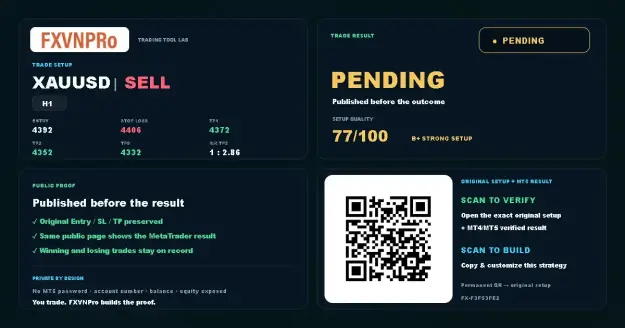 1 · SETUP
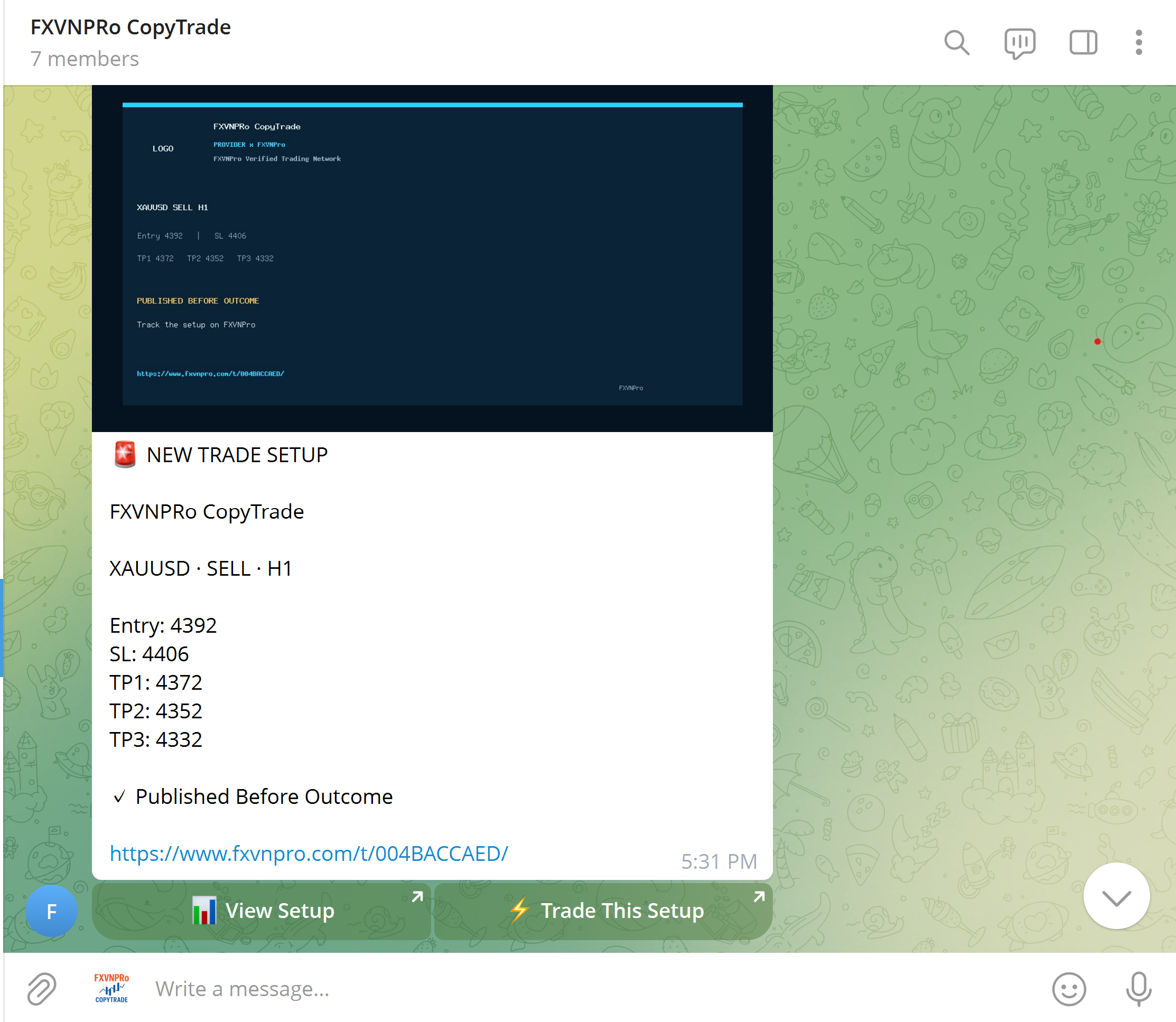 2 · TELEGRAM
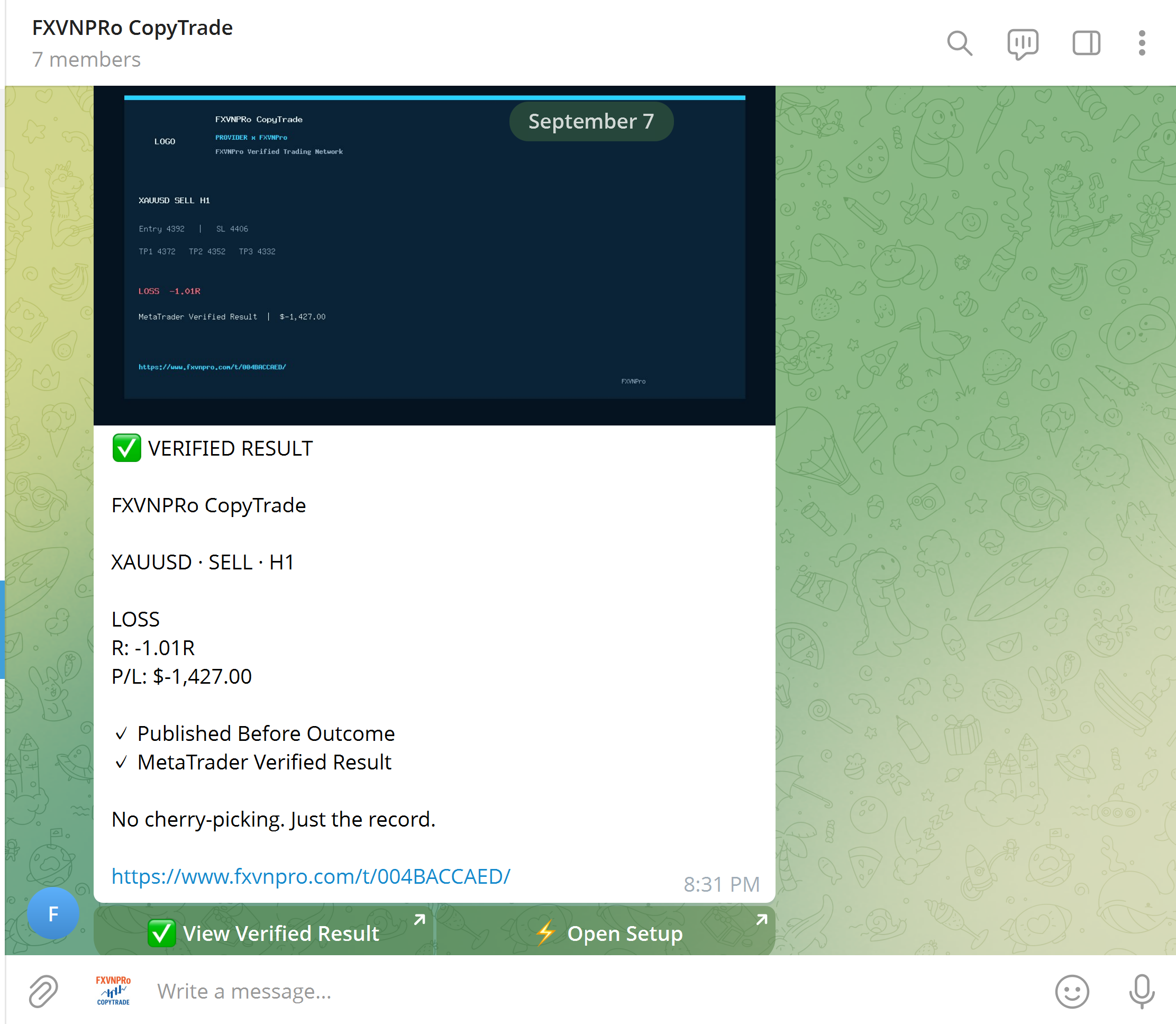 3 · VERIFIED
FXVNPro connects trade plans, Telegram trading communities and verified CopyTrade activity in one practical MT4/MT5 ecosystem.
Turn Entry, Stop Loss and Targets into a trade plan. Publish it before the outcome, then track and verify the result.
Turn Telegram signals into actionable MT4/MT5 setups. Signal Admins create the strategy while Members stay in control of risk.
Discover TRADERs, inspect verified trading history and performance, then decide who you want to follow across MT4 & MT5.
Build your strategy, distribute it to a community, or follow trading activity across MT4 & MT5.
Create Entry, Stop Loss and Targets before the outcome, then build a verified trading record.
Turn Telegram signals into an actionable workflow while followers keep control of their own risk.
Connect Chrome to MT4 or MT5 and open, modify or close trades from your browser.
Explore Masters and copy trading activity to your own MT4 or MT5 terminal with independent risk rules.