

Tickmill
FVP Score
7.2/10
Tickmill
- Minimum Deposit$50
- RegulationFCA, FSCA, CySEC
- PlatformsMT4, MT5
- SpreadFrom 0.0 pips
Start with your goal. You do not have to learn the FXVNPro architecture before using the tools.
Build an idea, use Telegram signals, trade from Chrome or follow a trader while technical setup stays in the background.
Technical connection details remain available inside each product when needed.
Compare Tickmill and XM by rating, regulation, minimum deposit, platforms, spreads, and overall trading conditions.
Use the FXVNPro Broker Checker Chrome extension to quickly review broker trust signals, ratings, and safety information while browsing broker websites.

| Feature | Tickmill | XM |
|---|---|---|
| Rating | 7.2 | 7.1 |
| Minimum Deposit | $50 | $5 |
| Regulation | FCA, FSCA, CySEC | CySEC, ASIC, IFSC |
| Platforms | MT4, MT5 | MT4, MT5 |
| Spread | From 0.0 pips | From 0.6 pips |
Below is a detailed breakdown of fees, spreads, regulation, platforms, and real trading suitability to help you decide which broker fits your trading style better.
Let me start with a question I ask traders all the time: if you’re chasing the “best spread,” are you actually measuring what it costs you when the market gets messy? Because in live FX trading, the spread headline is only half the story. Execution quality, commission structure (even when you don’t call it “commission”), trading hours, and withdrawal friction can quietly decide whether a strategy survives or bleeds out.
This is exactly why the Tickmill vs XM comparison matters. Both brokers offer MT4 and MT5, both sit under recognizable regulation, and both market themselves aggressively to retail traders. But the way they charge for trades—and the way they make you move money—can feel totally different once you’re placing real orders repeatedly.
Quick snapshot: Tickmill has a higher minimum deposit ($50 vs $5) and offers spreads from 0.0 pips, with regulation including FCA, FSCA, and CySEC. XM starts lower on deposits ($5), but spreads are typically from 0.6 pips and it’s regulated by CySEC, ASIC, and IFSC.
So which broker is better depends on what you trade and how you trade. If you scalp or run high frequency, you’ll care about spreads and execution speed more than almost anything. If you’re newer, deposit/withdrawal experience and platform comfort might matter more than shaving fractions of a pip. Keep reading and I’ll break down the fees comparison and the practical differences traders run into every week.
When traders say “cheap broker,” they usually mean one number: spreads. Tickmill’s data shows spreads from 0.0 pips, while XM’s starts from 0.6 pips. On paper, that alone suggests Tickmill can be the cheaper option—especially for strategies that rely on small price movements.
But here’s the catch I’ve learned the hard way: spreads don’t exist in a vacuum. A broker can advertise tight spreads, yet still charge via commission, swap/overnight rates differences, or less favorable execution during volatile conditions. You can also see “effective spread” widen around news or during low liquidity. That’s where you feel it. Your entries get less precise, your stops get hit more often, and your trade expectancy slowly erodes.
Let’s do a realistic example. Suppose you scalp EUR/USD and you’re targeting 1–2 pip moves with a tight stop. If Tickmill can truly offer 0.0–0.2 pip spreads in your session, your breakeven threshold improves. XM starting at 0.6 pips means you’re paying an extra ~0.6 pips each round-trip (roughly speaking, because spread impacts entry and exit). Over 50 trades a day, that’s not “small.” It’s a material hit.
Now, what about “hidden fees”? The main hidden pain points aren’t usually secret charges—they’re conditions. Watch for differences in swap rates for holding positions, and be mindful of any inactivity or currency conversion costs. Also, execution quality affects slippage, and slippage is the silent fee when markets gap or spike.
For a pure fees comparison focused on spreads and trading costs: Tickmill is positioned to be cheaper for active, short-horizon trading. XM may be more forgiving for beginners, but if you’re cost-sensitive, the spread gap matters.
Regulation is one of those topics traders skip until something goes wrong. And when something goes wrong, reading a regulator list is too late. You want to know what the oversight actually signals about operational standards: segregation practices, leverage controls, dispute handling, and investor protections.
Tickmill is regulated by FCA, FSCA, and CySEC. XM is regulated by CySEC, ASIC, and IFSC. These are not identical in strength or investor coverage, but the important point is that both brokers operate under multiple frameworks rather than relying on a single, lightweight jurisdiction.
So what does it mean in real trading conditions? For many traders, stronger or more demanding regulators typically translate into better compliance culture. That can show up indirectly—more transparent client processes, clearer risk disclosures, and more consistent account handling. It doesn’t eliminate risk, but it reduces the odds of the “platform behavior” problems that used to be more common with less regulated brokers.
Verification matters too. I’ve seen traders open accounts, deposit funds, then postpone verification. When they later request withdrawals or try to resolve an account issue, delays happen. If your broker’s compliance flow is strict (often a sign of seriousness), you’ll want to be proactive.
For trust level: Tickmill’s mix including FCA tends to be reassuring for traders who prioritize oversight quality. XM has strong regulators as well, especially with ASIC included, which is a serious name in retail trading oversight.
Bottom line: both can be considered regulated and structured, but if you’re asking “which broker is better” for safety-first trading, Tickmill slightly edges the conversation due to the broader, higher-profile regulation footprint—especially for traders in regions that value FCA-level governance.
Both brokers offer MT4 and MT5. That’s good news because it means you’re not locked into one proprietary interface. For many professional traders, this matters more than flashy web platforms. MT4 and MT5 are familiar, automation-friendly, and compatible with a wide ecosystem of indicators, EAs, and charting tools.
Still, execution speed and usability aren’t only about the platform software. They’re about how the broker routes orders, how consistently the terminal reflects real prices, and how stable the connection feels under load. MT4 can look identical across brokers, yet the “feel” changes when you place orders during news or when you’re trading lower-timeframe setups.
In real trading, here’s what you’ll notice: how quickly quotes update, whether market orders fill at expected prices, and how slippage behaves when spreads tighten or widen. If you run limit orders, you’ll also care about order placement accuracy—especially around high volatility when price moves faster than your screen.
Tickmill’s tight spread positioning (from 0.0 pips) can be a big deal if your strategy depends on precise entries. XM’s spread baseline is higher from the data (from 0.6 pips), but that doesn’t automatically make it worse—sometimes brokers prioritize stability and predictable execution rather than chasing the smallest spread prints.
Practical takeaway: if you’re already comfortable with MT4/MT5 and using automation, both work. The difference is likely to show up in execution quality and effective spreads during the moments that matter most. That’s the part you can’t fully see in a demo.
If your trading experience is still forming, the platform itself will feel similar. Your real decision will come down to trading costs and how smooth deposits/withdrawals feel—which we’ll get to next.
Spreads might decide profitability, but deposits and withdrawals decide whether you can stick with your plan. I’ve watched traders blow up accounts not because the strategy was bad, but because they got frustrated: delays, extra verification steps, or deposit methods that don’t match their lifestyle.
Tickmill’s minimum deposit is $50. XM’s is $5. That’s a huge difference for beginners who want to start small and learn without risking too much upfront. But the minimum deposit alone doesn’t tell the full story. What matters is how quickly funds move, what fees apply (if any), and whether withdrawal requests are handled cleanly.
For a trader funding a live account for the first time, a low minimum like XM’s can reduce psychological pressure. You can test your workflow: charting, order execution habits, and how quickly you can move from analysis to placing trades. However, don’t confuse “easy to deposit” with “easy to withdraw.” Always check withdrawal requirements and timelines in the broker’s process.
For more active traders, $50 is usually not a problem. But higher minimums can matter if you’re frequently topping up or managing multiple account strategies. Also, if you’re using specific payment rails (cards, bank transfers, e-wallets), your actual experience might differ based on region.
In real trading conditions, the best broker is the one that doesn’t interrupt your schedule. If you’re running a weekly routine—deposit on Monday, trade through the week, withdraw mid-month—predictable processing matters.
So, which broker wins on deposits and withdrawals? On minimum deposit alone, XM is clearly more accessible. For traders who are ready with a proper starting capital, Tickmill’s $50 threshold is still reasonable, and the bigger factor becomes how efficiently withdrawals are handled under your verification status.
If you’re new, you don’t just need a broker—you need a workflow that doesn’t overwhelm you. Beginners often focus on spreads and forget that most early losses come from execution errors, overtrading, and poor risk management. The broker can’t fix your strategy, but it can make the learning curve easier.
XM’s $5 minimum deposit is a clear advantage for beginners. It lets you build confidence with smaller position sizes and test how your orders behave. And because you’re dealing with less upfront commitment, you’re less likely to rush into high leverage just to “make the account matter.” That’s a subtle but important behavior shift.
Tickmill’s $50 minimum deposit is still not high, but it’s more of a commitment. In return, Tickmill’s “from 0.0 pips” spread positioning can benefit beginners too—especially if they trade during liquid sessions and use modest stops. Tight spreads can reduce the “tax” on learning. But beginners should understand something: tight spreads don’t protect you from bad entries.
Another beginner factor is how straightforward verification and trading setup feels. A broker with stricter compliance can cause delays if you’re not prepared with documents. It’s not a bad thing, it’s just reality. So if you’re new, plan ahead: complete verification early.
My practical recommendation for which broker is better for beginners: XM is generally the easier entry. The low minimum deposit helps you practice without stress. Tickmill is also workable for beginners, but its better suited to people who are already willing to start with a bit more capital and understand that cost efficiency matters.
Active traders don’t care about slogans. You care about spreads and slippage because your edge is thin. If you trade intraday, you’ll likely be sensitive to spreads during your main sessions—London overlap, New York open, and the minutes around economic news. Those are the times where “from X pips” becomes real.
Tickmill’s spreads from 0.0 pips are the headline that matters for scalpers and day traders. In practice, if your strategy targets small moves, every fraction of a pip counts. When you’re frequently entering and exiting, the cost of spread adds up fast. Even if the average spread isn’t always 0.0, the broker’s positioning suggests it can support low-cost trading conditions.
XM’s spreads from 0.6 pips are still tradable, but you’re starting from a higher cost baseline. For some day traders, that might be fine if their setups capture larger ranges. For scalpers, it can be the difference between a strategy that survives and one that gradually underperforms.
Also consider execution speed and consistency. Tight spreads mean nothing if fills are delayed or slippage is excessive. You’ll want your terminal to react quickly, and you want the broker to respect your order logic consistently, especially when markets spike.
If you’re running high-volume trading—multiple Connects, multiple times a day—cost compounds. That’s where Tickmill vs XM becomes less about which platform you prefer and more about which broker reduces trading costs and execution friction.
My call for active traders: Tickmill is the better fit if your strategy is cost-sensitive and you trade frequently. XM can still work, but you’ll generally need wider targets or a strategy that’s less dependent on minimal spread.
Tickmill pros: Spreads from 0.0 pips can reduce trading costs for frequent traders; regulated across FCA/FSCA/CySEC; MT4/MT5 available.
Tickmill cons: Higher minimum deposit ($50) may be a barrier for absolute beginners; like any broker, spreads and execution quality still vary by market conditions.
XM pros: Very low minimum deposit ($5) makes it easy to start; regulated by CySEC/ASIC/IFSC; MT4/MT5 available.
XM cons: Spreads from 0.6 pips can be more expensive for scalping and high-frequency strategies; cost efficiency may lag for traders targeting very small moves.
Here’s how I’d frame it in one line: if you’re asking “which broker is cheaper for active trading,” Tickmill has the advantage in the spread race. If you’re asking “which broker is easier to begin with,” XM wins on entry flexibility.
And don’t ignore that both will still require you to manage risk properly. A broker can lower your friction, but it can’t fix a strategy that’s over-leveraged or poorly planned. That’s where most traders lose—before the spread ever becomes a real issue.
Let’s make the decision clean, because “both are fine” doesn’t help when your next week of trading depends on real costs.
Tickmill is the better choice for active traders—especially scalpers and day traders who care about spreads and want the potential for very low spread conditions (from 0.0 pips). If your strategy’s profitability depends on minimizing trading costs and you place trades often, Tickmill is positioned to be more favorable. Add the strong regulation footprint (FCA/FSCA/CySEC) and you have a setup that suits serious trading routines.
XM is the better choice for beginners and low-budget starters. The $5 minimum deposit is a major practical advantage. It helps you learn the platform, practice execution, and avoid “all-in” behavior caused by a higher minimum deposit. If you’re still building trading discipline, that matters more than squeezing the tightest spread possible.
Now, if you’re still unsure, use this rule of thumb: if you trade frequently and your average holding period is short, you should prioritize spreads and execution quality—lean Tickmill. If you trade less often, you’re still learning, and your priority is getting started with minimal friction—lean XM.
In the Tickmill vs XM matchup, the “which broker is better” answer isn’t one-size-fits-all. But the cost and accessibility differences are clear enough that you can choose with confidence based on how you actually trade.
One real XAUUSD trade: created before the outcome, sent to Telegram, TRADEd in MT5 and returned as a verified result.
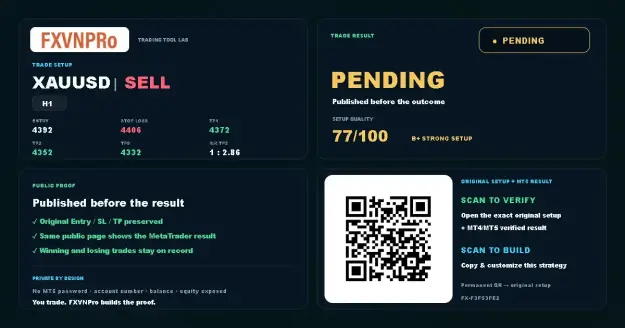 1 · SETUP
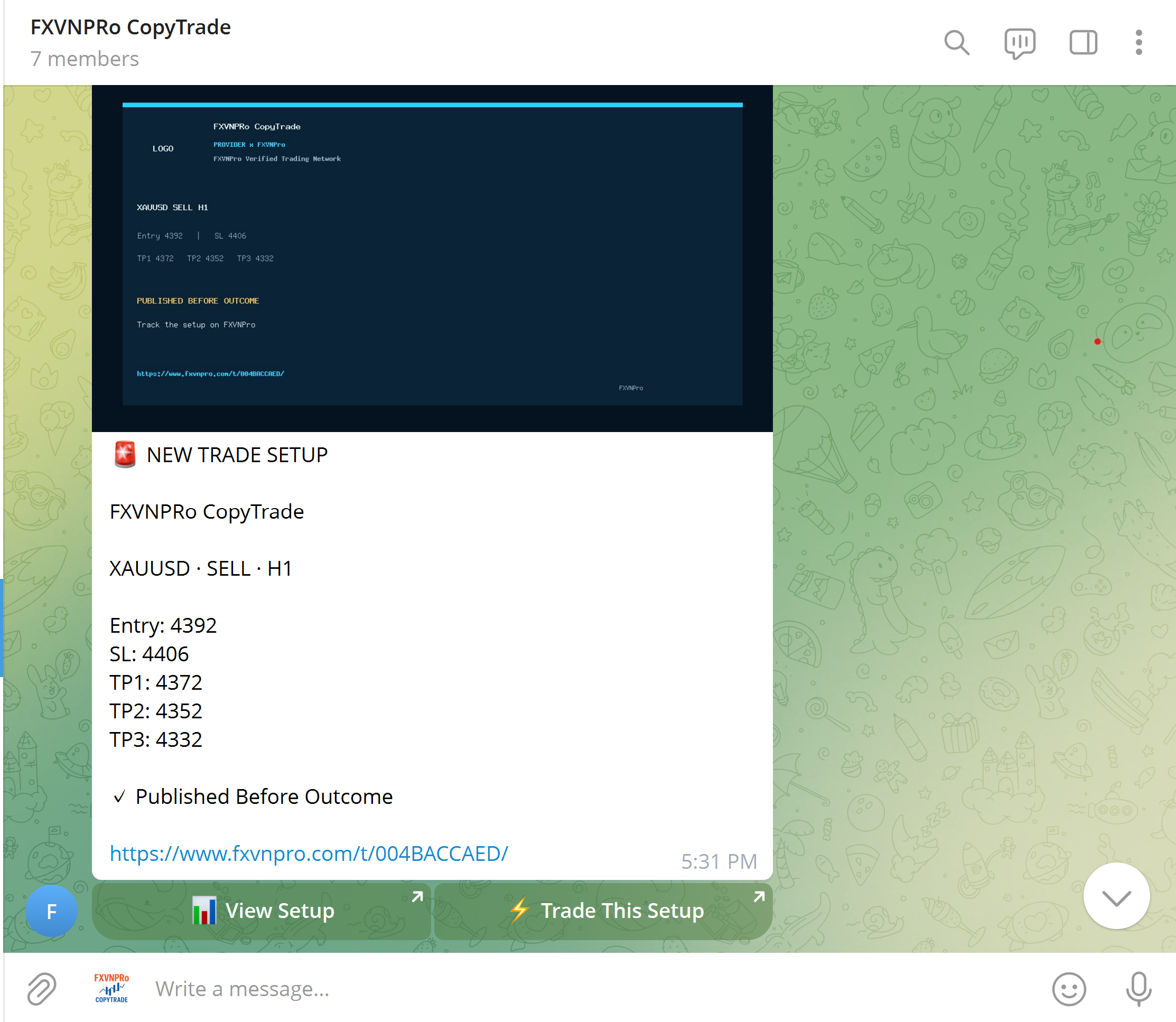 2 · TELEGRAM
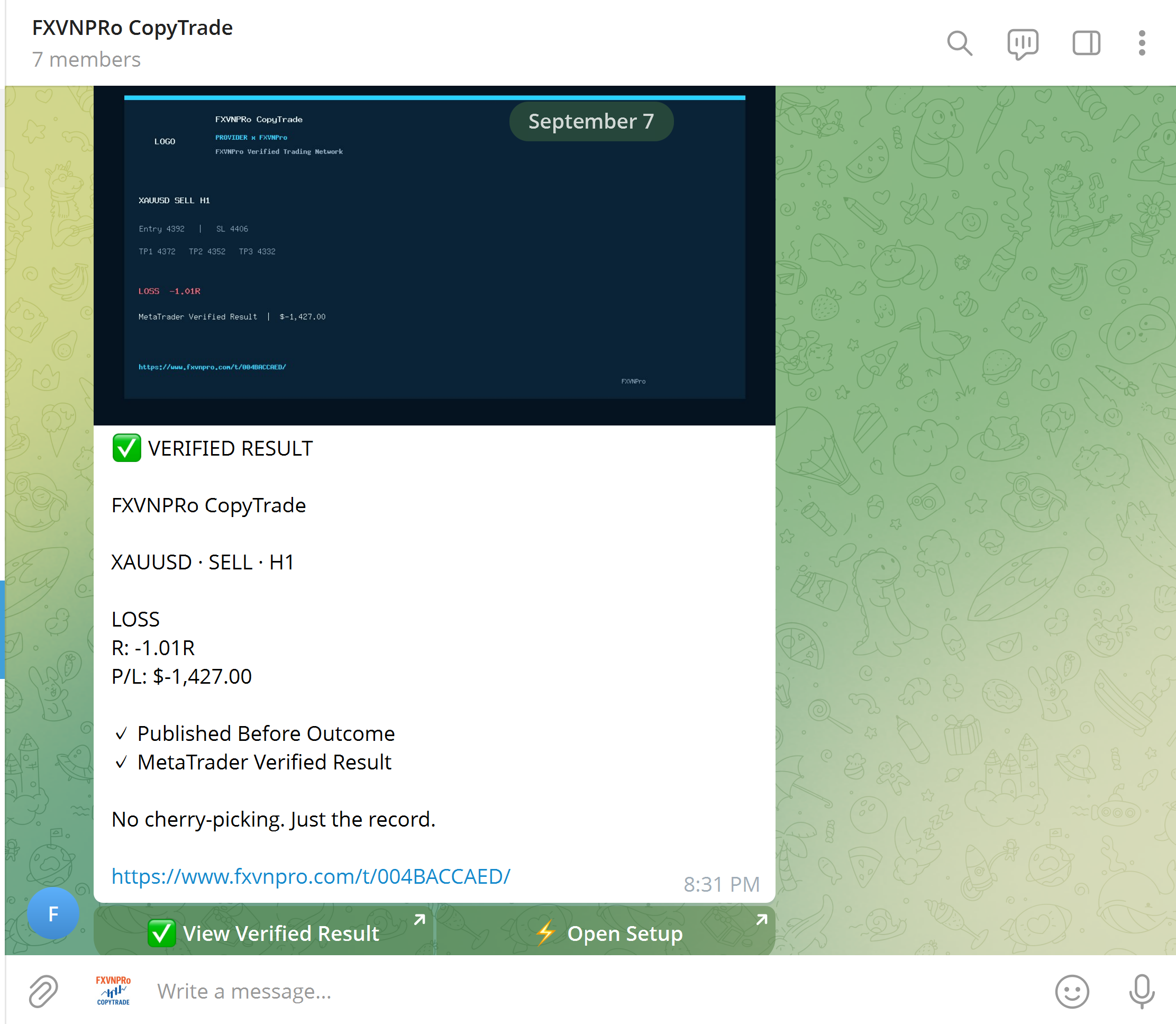 3 · VERIFIED
FXVNPro connects trade plans, Telegram trading communities and verified CopyTrade activity in one practical MT4/MT5 ecosystem.
Turn Entry, Stop Loss and Targets into a trade plan. Publish it before the outcome, then track and verify the result.
Turn Telegram signals into actionable MT4/MT5 setups. Signal Admins create the strategy while Members stay in control of risk.
Discover TRADERs, inspect verified trading history and performance, then decide who you want to follow across MT4 & MT5.
Build your strategy, distribute it to a community, or follow trading activity across MT4 & MT5.
Create Entry, Stop Loss and Targets before the outcome, then build a verified trading record.
Turn Telegram signals into an actionable workflow while followers keep control of their own risk.
Connect Chrome to MT4 or MT5 and open, modify or close trades from your browser.
Explore Masters and copy trading activity to your own MT4 or MT5 terminal with independent risk rules.