Plan a Trade
Build a structured setup and use practical trading tools before you act.
Trade IdeasRisk ToolsCalculators
BUILD A TRADE IDEA →
Plan trades, connect MT4 & MT5, review verified execution, explore traders and research brokers — without learning the whole platform first.
Build a structured setup and use practical trading tools before you act.
Use Browser Trading or turn supported Telegram signals into a structured trading workflow.
Explore CopyTrade Masters, review their records and choose your own risk settings.
Compare Just Markets and XM by rating, regulation, minimum deposit, platforms, spreads, and overall trading conditions.
Use the FXVNPro Broker Checker Chrome extension to quickly review broker trust signals, ratings, and safety information while browsing broker websites.


| Feature | Just Markets | XM |
|---|---|---|
| Rating | 6.5 | 7.1 |
| Minimum Deposit | $10 | $5 |
| Regulation | CySEC, FSA, FSCA, FSC | CySEC, ASIC, IFSC |
| Platforms | MT4, MT5 | MT4, MT5 |
| Spread | From 0.1 pips | From 0.6 pips |
Below is a detailed breakdown of fees, spreads, regulation, platforms, and real trading suitability to help you decide which broker fits your trading style better.
If you’ve ever taken a position, watched it move a little in your favor, and then… still ended the day down, you already understand the problem isn’t only direction. It’s costs. It’s execution quality. It’s how spreads behave when the market gets busy. That’s why “Just Markets vs XM” isn’t just an academic comparison—it’s about whether your strategy survives real trading conditions.
This review is for traders who actually place trades (not just demo). If you scalp, trade news, or run a steady daily routine, the details in “fees comparison,” “spreads and trading costs,” and execution behavior can matter more than most people admit.
Quick reality check: Just Markets (minimum deposit $10) starts with spreads from 0.1 pips, while XM (minimum deposit $5) lists spreads from 0.6 pips. Regulation is a mixed bag on paper: Just Markets is overseen by CySEC, FSA, FSCA, and FSC, while XM sits under CySEC, ASIC, and IFSC. Both offer MT4 and MT5, which is great—because your platform comfort can stay consistent while you choose the better cost structure.
So, which broker is better for you? By the end, you’ll have a practical answer for different trading styles, not a vague “they’re similar” verdict.
Let’s talk money the way it hits your account. Spreads are the most visible cost, but traders often forget that spread “from” numbers can hide the real story: how often you actually get that level, and what happens during volatile moments.
Just Markets advertises spreads from 0.1 pips. On paper, that’s a big advantage if you trade frequently or run tight technical entries. Even if you don’t get the absolute minimum every time, starting with a lower baseline generally helps strategies that depend on small edges—scalping, mean reversion, and fast intraday systems.
XM lists spreads from 0.6 pips. That’s not automatically “bad,” but it usually means higher average costs for short-horizon trading. In real trading conditions—like London open volatility or rollover—spreads can widen. If your typical spread is already higher to begin with, the widening hurts more.
Now, about “hidden fees.” Both brokers use the term structure common in retail FX: spreads are the headline. Commission is not provided in the data you gave, so I’m not going to pretend one charges less commission without evidence. Instead, here’s the practical approach: compare your effective cost per trade. Effective cost = spread + any additional charges (if your account has them) + slippage impact.
Example: If you do 50 trades in a week on EUR/USD, a 0.5 pip difference in average spread can become a real number fast—especially if your average win is only a few pips. Which broker is cheaper in that scenario? The one with the tighter spreads on average—where Just Markets has the clear edge based on the listed “from 0.1” vs “from 0.6.”
Traders love to see “regulated” on a homepage, but safety is more nuanced than the regulator name. What matters is enforcement culture, client protections, and whether the broker is actually accountable when something goes wrong.
Just Markets is listed under CySEC, FSA, FSCA, and FSC. That’s a broad footprint across regions. In practical terms, multiple regulators can mean more oversight on capital adequacy, risk controls, and business conduct. It doesn’t eliminate risk—nothing does—but it raises the probability that problematic behavior gets corrected sooner.
XM is listed with CySEC, ASIC, and IFSC. ASIC oversight is generally taken seriously in the market, and CySEC is well-known in Europe. IFSC is also a regulator you’ll see with many international brokers. The key question isn’t “do they have regulators?” It’s “how consistently are they held to standards in the jurisdictions that apply to your account?”
Verification also matters. Make sure your account setup, documentation process, and withdrawal path are aligned with the regulator requirements for your region. I’ve seen traders lose time (and sometimes credibility with support) because their KYC wasn’t ready when they tried to withdraw.
Real-world takeaway: If you care about risk management beyond your own stops—broker oversight matters. Based on the data provided, Just Markets looks stronger on breadth of regulators. XM is still covered by reputable names, but if you want the “more oversight angles” profile, Just Markets edges it.
Both Just Markets and XM offer MT4 and MT5. That’s important because it keeps the transition simple. If you already have indicators, EAs, or a workflow built around MT4/MT5, you’re not rebuilding your trading life from scratch.
Still, the platform experience isn’t only about MT4 vs MT5. Execution speed, server response, and how reliably the platform handles order modifications can change your results—especially if you’re active and you manage trades actively.
In real trading conditions, the “feel” of execution matters during fast moves. Think about a breakout where you don’t want slippage eating your entry. If you’re placing orders repeatedly, a broker with smoother handling of order requests tends to reduce the small frustrations that turn into bigger errors.
MT5 users often care about more than charting—depth of market features, netting/hedging modes, and the ecosystem of MT5 EAs. MT4 users usually care about stability and compatibility with older systems.
Another practical difference: tool availability around the platform. You didn’t provide education, research, or VPS options details, so I won’t invent them. But what you should check before choosing is how easy it is to access historical data, whether the broker’s trade server time matches your charting assumptions, and whether the platform’s order history is clean enough to analyze performance.
For trading experience, if you already run MT4/MT5, both are workable. The bigger differentiator is usually not the platform choice—it’s the costs and execution quality behind it. That’s where Just Markets’ tighter spreads can translate into a more forgiving trading environment.
Most comparisons obsess over spreads and forget what happens when you actually want to move money. Deposit and withdrawal friction can cost you time, create delays in risk management, and in some cases force you to trade differently than planned.
Minimum deposit is one of those “small” details that can decide whether you even get started. Just Markets lists $10, while XM lists $5. If you’re starting small or testing a strategy, XM’s lower minimum can feel less intimidating.
But minimum deposit isn’t the whole story. The real question is: how fast are withdrawals processed, what fees apply (if any), and how long does it take for funds to show up after approval? Even one extra processing day can matter if you’re actively managing account size or planning around scheduled trading sessions.
In real trading, liquidity and timing matter. Suppose you run a trading week where you either scale up after wins or cut risk after losses. If withdrawals are slow, you may end up overexposed longer than you wanted—or you keep trading because the money isn’t where you need it.
Also consider payment method constraints. Some brokers process certain methods faster than others. If your preferred method isn’t the fastest, it effectively increases friction.
Based on the data you provided alone, XM has the edge on starting with less capital. But for traders who will eventually scale and need smoother withdrawal timing, you should treat deposits/withdrawals as a due-diligence item. Don’t guess—check withdrawal turnaround times and whether you’ll need extra verification documents.
Beginners don’t usually lose money because they lack discipline. They lose money because the market is expensive and the learning curve is steep. When you’re new, you need a broker that won’t add extra cost pressure while you’re still building your edge.
XM’s lower minimum deposit ($5) makes it easier to get started. That matters if you’re not ready to commit a bigger amount yet. Also, beginners often prefer simple, familiar workflows. Since both brokers provide MT4 and MT5, platform familiarity is less of a concern.
Now here’s the part most “beginner guides” skip: spread impact on your early learning. New traders frequently take more trades than they should. They widen their stop too much, or they exit too early. In those messy early phases, costs can stack up. If you’re trading with a strategy that doesn’t have strong edge yet, lower spreads act like a buffer.
Just Markets has spreads from 0.1 pips, which can be friendlier to small intraday targets. If your typical plan is “grab a few pips and be done,” a higher spread baseline can turn “small wins” into “break-even churn.” That’s demoralizing for beginners.
So which broker is better for beginners? If you’re starting with very small capital and want the simplest entry, XM’s $5 minimum is attractive. But if you want the learning period to be less costly—especially if you’ll trade more often—Just Markets’ tighter spreads give it the better practical advantage.
Active traders don’t just “care” about spreads—they live inside them. Scalpers, day traders, and anyone trading multiple times per session needs predictable pricing, low average spread, and minimal execution weirdness.
Just Markets, with spreads from 0.1 pips, fits the active-trader profile better on cost alone. If you’re running a strategy that depends on tight entries—like trading a specific session range or fading minor breakouts—the difference between 0.1 and 0.6 pips isn’t theoretical. It directly changes whether your take-profit levels are realistic.
XM’s spreads from 0.6 pips can still work for day trading, but you generally need either wider targets, better signal quality, or more tolerance for cost drag. In real trading conditions, the “from” number matters less than your actual average spread during the times you trade. If you’re trading during the busiest liquidity windows, you may see improvement. If you trade at quieter hours, spreads might stay less favorable.
Execution speed and slippage also matter, especially when you scale in or out quickly. Even small slippage on multiple orders can compound into a meaningful performance hit for active traders.
Finally, tools. Active traders care about whether MT4/MT5 integration is smooth, whether trade history is easy to audit, and whether the broker’s environment supports fast order management. Both brokers offer MT4/MT5, so you’re not choosing between fundamentally different ecosystems.
If your priority is scalping or high-frequency intraday trading, Just Markets is the better fit from the data provided—primarily because the spread advantage is large and directly relevant to your P&L.
One more thing: when you’re choosing which broker is better, don’t stop at the “from” spreads. Test your real conditions. Use a small live account if possible, compare your average spread during your typical trading hours, and track slippage on market orders. That’s the difference between choosing on paper and choosing with confidence.
If you’re asking which broker is better overall for real trading, I’ll be direct: Just Markets is the stronger option for most active traders because the spread profile is meaningfully tighter (from 0.1 pips vs from 0.6 pips). That’s not a small detail. It’s the kind of edge that shows up repeatedly across weeks, especially if you trade often or aim for modest targets.
XM is still a solid choice, but it fits better for traders who prioritize easier account entry and don’t need ultra-tight pricing. The lower $5 minimum deposit can be genuinely helpful when you’re starting out, experimenting, or keeping risk tightly controlled while you build your routine.
Here’s the clean breakdown:
Bottom line: don’t let “minimum deposit” blind you. Beginners should care about affordability, yes—but active traders should care about the cost structure they’ll face every single day. In “Just Markets vs XM,” spreads and trading costs are the decision lever, and Just Markets pulls harder on that lever.
One real XAUUSD trade: created before the outcome, sent to Telegram, executed in MT5 and returned as a verified result.
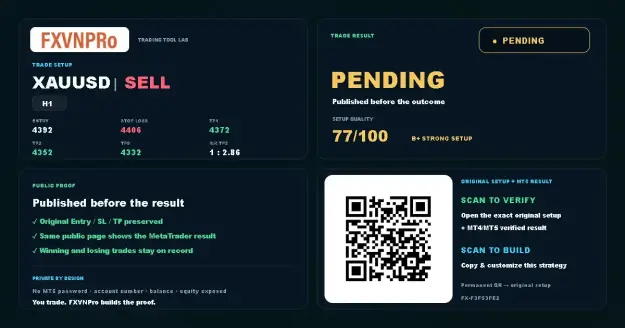 1 · SETUP
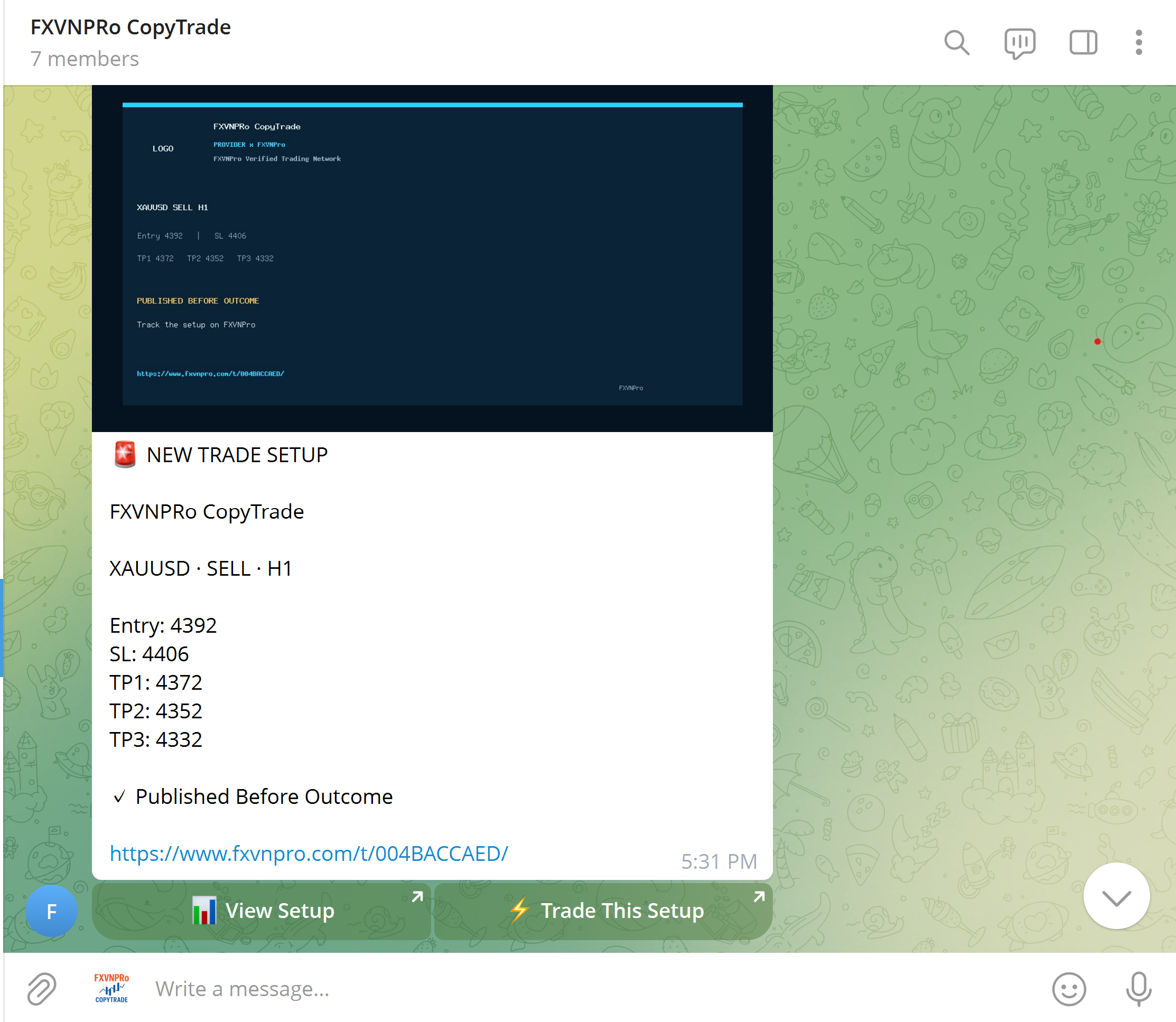 2 · TELEGRAM
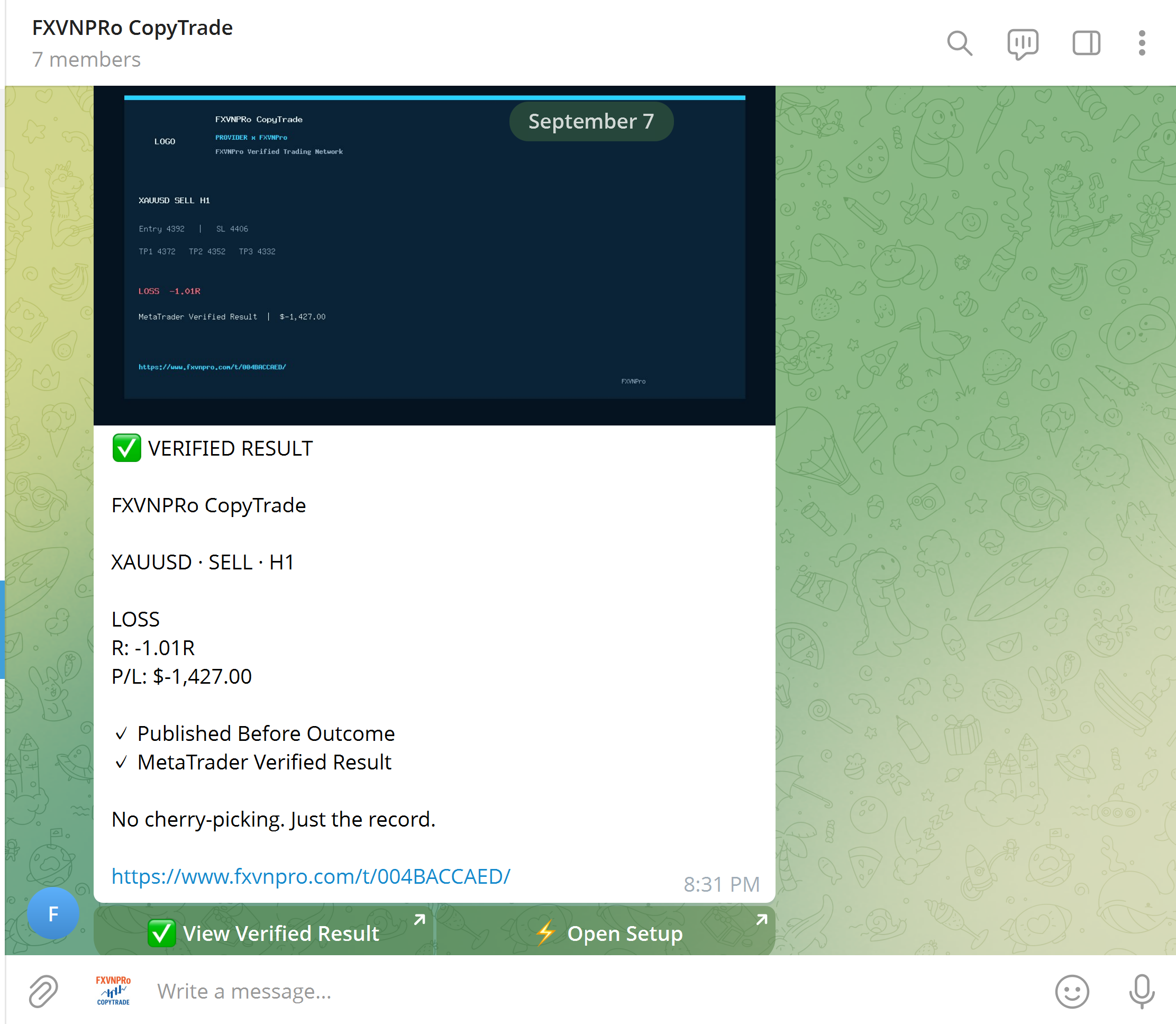 3 · VERIFIED
Build your strategy, distribute it to a community, or follow trading activity across MT4 & MT5.
Create Entry, Stop Loss and Targets before the outcome, then build a verified trading record.
Turn Telegram signals into an actionable workflow while followers keep control of their own risk.
Connect Chrome to MT4 or MT5 and open, modify or close trades from your browser.
Explore Masters and copy trading activity to your own MT4 or MT5 terminal with independent risk rules.
 GUIDE
GUIDE