Plan a Trade
Build a structured setup and use practical trading tools before you act.
Trade IdeasRisk ToolsCalculators
BUILD A TRADE IDEA →
Plan trades, connect MT4 & MT5, review verified execution, explore traders and research brokers — without learning the whole platform first.
Build a structured setup and use practical trading tools before you act.
Use Browser Trading or turn supported Telegram signals into a structured trading workflow.
Explore CopyTrade Masters, review their records and choose your own risk settings.
Compare BlackBull and Just Markets by rating, regulation, minimum deposit, platforms, spreads, and overall trading conditions.
Use the FXVNPro Broker Checker Chrome extension to quickly review broker trust signals, ratings, and safety information while browsing broker websites.


| Feature | BlackBull | Just Markets |
|---|---|---|
| Rating | 6.4 | 6.5 |
| Minimum Deposit | $1 | $10 |
| Regulation | FSP | CySEC, FSA, FSCA, FSC |
| Platforms | MT4, MT5,cTrader,TradingView | MT4, MT5 |
| Spread | From 0.0 pips | From 0.1 pips |
Below is a detailed breakdown of fees, spreads, regulation, platforms, and real trading suitability to help you decide which broker fits your trading style better.
If you’ve traded FX long enough, you know the funny thing about broker comparisons: the big headlines rarely move your equity curve. It’s the boring stuff—spreads at the wrong moment, a slightly awkward withdrawal, slippage during news—that quietly adds up. That’s why this BlackBull vs Just Markets comparison is written the way I’d assess brokers before pushing real size. Not as a marketing brochure. As a working trader.
BlackBull comes in with a very low minimum deposit ($1) and a spread profile “from 0.0 pips,” plus a broader platform mix (MT4, MT5, cTrader, TradingView). Just Markets has a higher minimum deposit ($10) but tighter regulatory coverage on paper (CySEC, FSA, FSCA, FSC) and a typical spread starting point “from 0.1 pips,” with MT4 and MT5 only.
So which broker is better for you? If you’re cost-sensitive and you want platform flexibility (including cTrader), BlackBull is the more interesting option. If you prioritize regulatory footprint and you mostly trade on MT4/MT5, Just Markets is the cleaner fit. But let’s not guess—let’s run the fees comparison and talk about trading costs in real conditions.
Let’s start where traders feel it immediately: spreads and how they behave when you actually need them. BlackBull advertises spreads “from 0.0 pips.” On paper, that can look like a scalper’s dream. But spreads aren’t one static number—you’ll see them widen during low liquidity, rollover, and certain news windows. In real trading conditions, the question becomes: how often do you get those near-zero reads, and how quickly does the market revert after volatility spikes?
Just Markets shows spreads “from 0.1 pips.” That sounds slightly higher, but here’s the nuance: a consistent spread can be better than a “perfect” spread that only appears intermittently. Also, both brokers may use commission structures depending on account type (and that’s where many comparisons get sloppy). If you’re comparing only the spread “from” figure, you can misread the true fees comparison—especially for active traders.
Scenario: you run a simple mean-reversion strategy on EUR/USD during London. If BlackBull is offering near-zero spreads at your execution times, your average cost per round trip drops. Over 200–500 trades a month, that matters. But if Just Markets stays steadier and your platform shows fewer nasty widening events, you may end up paying less in practice—even with the higher “from” spread.
Hidden fees to watch for: financing/overnight charges (swap rates), any inactivity fees (if applicable), and costs related to deposit/withdrawal rails. Spreads are only one part of the total trading costs equation.
Regulation is one of those topics traders either glaze over or overreact to. The truth is more practical: regulation affects your recourse if something goes wrong—withdrawal delays, account issues, or worse. It also influences how brokers structure client money handling and oversight.
BlackBull lists “FSP” as regulation. In practice, you’ll want to confirm the exact entity name and license scope, because “FSP” can be ambiguous if you don’t verify the specific authorization. This matters because enforcement strength and client protections vary by jurisdiction and license conditions. When you’re deciding which broker is better for risk management, you don’t just want “regulated”—you want the right regulator covering the right legal entity that actually holds your account.
Just Markets lists CySEC, FSA, FSCA, and FSC. That’s a broader regulatory footprint, and it tends to signal tighter oversight across regions. For traders, the real question is: do these registrations correspond to the same entity you’re trading with, and do they apply protections that you can rely on when you submit withdrawal requests?
Here’s a real-world check I recommend: before funding, look at the exact regulated entity shown in your account opening docs, then compare it to the broker’s website disclosures. That verification step is boring, but it prevents the “I thought I was protected” problem.
Bottom line: if regulation and safety are your priority, Just Markets has the cleaner set of signals. But don’t stop there—verify the entity details tied to your specific account.
Platforms aren’t just “where you place trades.” They change your workflow, your ability to monitor risk, and sometimes even how you manage fills. BlackBull offers MT4, MT5, cTrader, and TradingView. That’s a strong mix if you’re the kind of trader who likes switching charting tools or building a hybrid setup. For example, many traders start with TradingView for charting and ideas, then execute with MT4/MT5 or cTrader depending on how the broker handles order types.
Just Markets sticks to MT4 and MT5. That’s not bad—MT4 remains a favorite for straightforward execution, and MT5 is solid for strategies that need more instruments or additional backtesting features. But if you rely on cTrader’s interface, depth-of-market style workflow, or you just prefer cTrader’s handling of certain order management habits, you’ll feel that limitation quickly.
Execution speed and usability are where traders notice differences. In fast conditions, a platform that’s stable and responsive matters. You don’t want to be fighting freezes while the market is moving. I’ve seen traders blame “news volatility” when the real issue was a platform update, a connectivity glitch, or a broker-side latency spike that only shows up under load.
Also consider integrations: if you use TradingView alerts to trigger execution via a workflow, BlackBull’s platform range can reduce friction. If you live inside MT4/MT5 and you don’t care about cTrader, Just Markets won’t feel limiting.
So which broker is better for platform fit? BlackBull wins on flexibility. Just Markets wins if you want a focused MT4/MT5 experience and nothing else.
Most broker reviews talk about “availability” and “methods.” Traders care about something more specific: how smooth is the whole process when you’ve got open positions and you want to manage your account like a system? Deposit speed affects your ability to move on opportunities. Withdrawal speed affects your confidence, especially after a profitable month.
BlackBull’s minimum deposit is $1, which is genuinely useful for testing execution quality and platform stability without risking much capital. That’s a real advantage if you’re evaluating slippage, spreads and trading costs across a couple of sessions. In other words, you can run a controlled “trial period” without draining your funds.
Just Markets has a $10 minimum deposit. Not huge, but it does raise the barrier slightly for brand-new traders who want to keep risk minimal while they learn how the broker routes orders, handles timezones, and processes requests.
Fees and withdrawal friction can also differ based on payment methods. Some brokers pass through charges from payment providers, while others absorb them. The real-world difference shows up when you withdraw more frequently—like weekly for active traders or when you’re running a funded account strategy that requires regular balance resets.
Here’s the practical approach: before you commit, check (1) withdrawal processing time ranges, (2) whether withdrawals require extra verification steps, and (3) if there are any minimum withdrawal limits. If the broker asks for document verification, do it early, not after your first profitable trade.
If you’re the type who wants low-friction testing, BlackBull’s $1 minimum is comforting. If you’re comfortable depositing $10 and you value a larger regulatory footprint, Just Markets fits that mindset better.
For beginners, the biggest danger isn’t just losing money—it’s losing momentum. When a broker adds confusion (platform setup, unclear execution behaviors, slow withdrawals, or account restrictions), new traders get discouraged fast. So when asking which broker is better for beginner suitability, you should focus on the “first two weeks experience,” not the theoretical best conditions.
BlackBull has a $1 minimum deposit, which lowers the stakes as you learn. That matters more than it sounds. You can place a few trades, observe spread behavior during different sessions, and test how the platform handles order placement without putting meaningful capital at risk. BlackBull also gives you multiple platforms (MT4, MT5, cTrader, TradingView). For beginners, TradingView can make charting less intimidating, while MT4/MT5 provides the classic trading environment.
Just Markets’ $10 minimum is still accessible, but it’s less forgiving if your goal is “learn first, scale later.” On the positive side, Just Markets lists multiple regulators, which can be reassuring for newcomers who are unsure how to evaluate broker credibility.
In real trading conditions, beginners also struggle with misunderstanding costs. If your strategy depends on tight spreads and you place trades during illiquid hours, you’ll feel “the broker is bad” even when the issue is timing. A beginner-friendly broker setup should make those costs visible and consistent.
My take: BlackBull is easier to start with because the minimum deposit and platform variety let you experiment safely. Just Markets is better if you want stronger-regulation reassurance from day one and you’ll stick to MT4/MT5 only.
Active traders don’t just look at spreads—they look at what happens when spread and volatility collide. Scalping and day trading live and die by execution quality: slippage, order handling, and how quickly the broker routes your trades when you’re hitting buttons fast (or when an EA is hammering the market).
BlackBull advertises spreads “from 0.0 pips,” and that can matter for high-frequency strategies. If those near-zero spreads are actually reachable during your trading hours, the math works. But active traders should also watch for widening during news, rollovers, and sudden liquidity drops. It’s not enough to see a low spread in the platform during quiet times.
Just Markets lists “from 0.1 pips.” For many day traders, that difference is negligible compared to execution consistency. The higher priority becomes: does the broker maintain stable fills when the market moves, and does MT4/MT5 performance hold up under load?
Also think about tools. BlackBull’s platform range includes cTrader, which many traders like for its workflow when managing frequent orders. Just Markets relies on MT4 and MT5, which are totally capable for scalping, but you’ll be using the tools you already know.
Scenario: you run a news-aware strategy and enter around scheduled events, placing multiple orders. If one broker delivers smoother execution during volatility, your stop-outs drop and your average win improves. That’s where “execution speed, slippage, and trading experience” become more important than the headline spread.
If you’re an active trader who wants maximum flexibility and potentially lower spread reads, BlackBull is the more aggressive choice. If you’re an MT4/MT5 purest and you value regulatory coverage, Just Markets can be the safer operational fit.
BlackBull pros: Very low minimum deposit ($1) for testing; wider platform selection (MT4, MT5, cTrader, TradingView); spread advertising “from 0.0 pips,” which can benefit strategies sensitive to entry costs.
BlackBull cons: Regulation label shown as “FSP” needs careful entity verification; for some traders, the “from” spread headline may not reflect average real trading costs across all sessions.
Just Markets pros: Multiple regulators listed (CySEC, FSA, FSCA, FSC) which is generally reassuring from a safety perspective; MT4/MT5 platform focus is familiar and efficient; spread “from 0.1 pips” is reasonable for most day trading.
Just Markets cons: Higher minimum deposit ($10); fewer platform options (no cTrader or TradingView in the provided setup), so you may be locked into MT4/MT5 workflow.
Fees comparison caution: Don’t rely only on “from” spreads—check account type, commissions (if any), and overnight financing. That’s where the actual trading costs can swing.
Here’s the decision I’d make as a trader, not as a reviewer. In BlackBull vs Just Markets, both can work, but they’re aimed at slightly different priorities.
Choose BlackBull if: you want the lowest barrier to testing (that $1 minimum deposit is genuinely helpful), you care about platform flexibility (MT4, MT5, cTrader, TradingView), and you’re trading strategies that are sensitive to spreads and entry cost. If you’re the kind of trader who monitors slippage and wants options when execution feels off, BlackBull is the better fit.
Choose Just Markets if: you prioritize regulation coverage and want that extra comfort factor, and you’re comfortable trading primarily on MT4/MT5. If your workflow is simple—MT4/MT5, no need for cTrader/TradingView—and you’d rather focus on execution consistency and operational safety, Just Markets is the clearer pick.
For fees comparison, neither broker wins purely on the “from” spread alone. You should base your final choice on your real trading hours and your strategy’s cost profile. Demo first, then run a small live test for a couple of weeks. Watch average spreads, not just the minimum. Then scale.
If you tell me your instruments (EUR/USD only? majors? indices?), your typical trading session (London/NY/Asia), and whether you scalp or swing trade, I can recommend the more practical option for your exact style.
One real XAUUSD trade: created before the outcome, sent to Telegram, executed in MT5 and returned as a verified result.
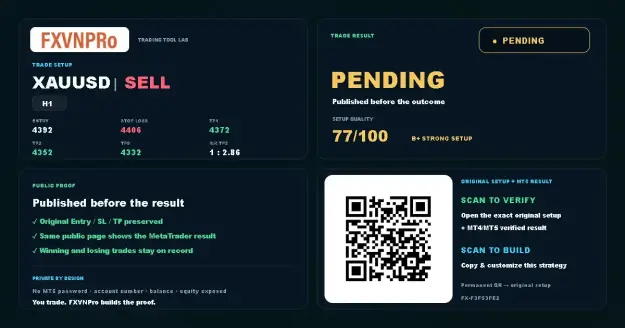 1 · SETUP
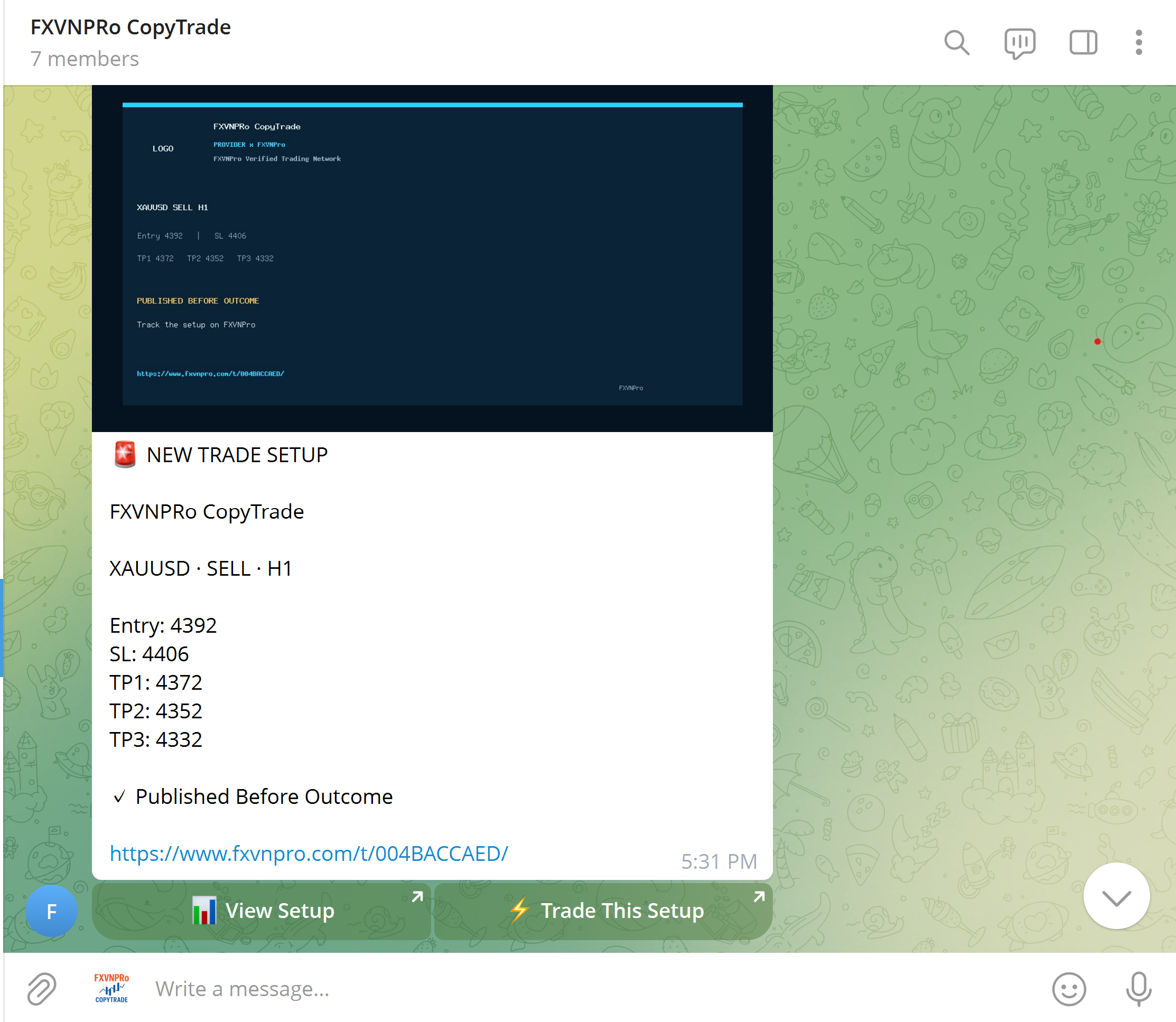 2 · TELEGRAM
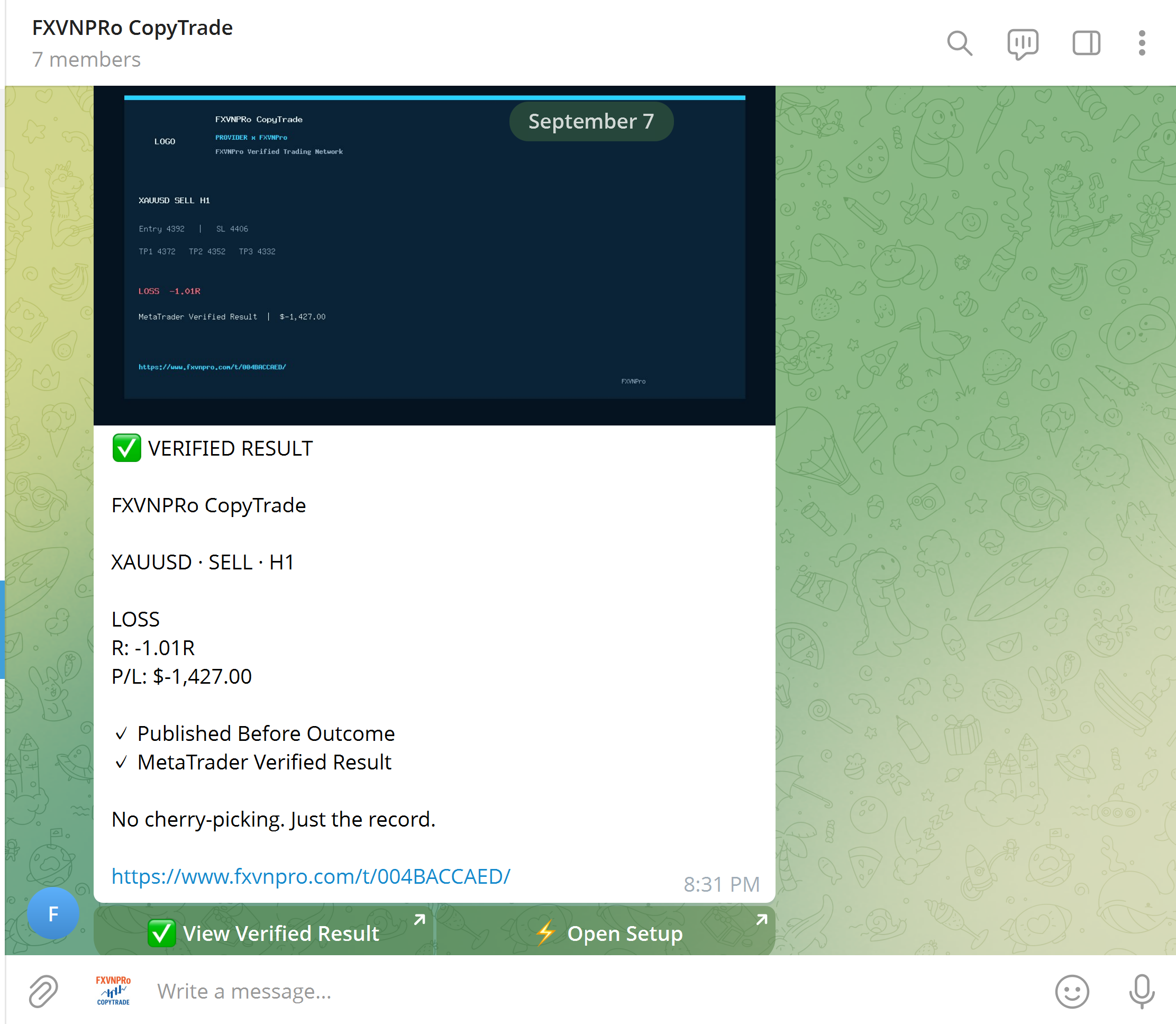 3 · VERIFIED
Build your strategy, distribute it to a community, or follow trading activity across MT4 & MT5.
Create Entry, Stop Loss and Targets before the outcome, then build a verified trading record.
Turn Telegram signals into an actionable workflow while followers keep control of their own risk.
Connect Chrome to MT4 or MT5 and open, modify or close trades from your browser.
Explore Masters and copy trading activity to your own MT4 or MT5 terminal with independent risk rules.
 GUIDE
GUIDE